> For the complete documentation index, see [llms.txt](https://docs.valorx.com/llms.txt). Markdown versions of documentation pages are available by appending `.md` to page URLs; this page is available as [Markdown](https://docs.valorx.com/valorx-fusion/versions-and-release-notes/windows/older-versions/google-sheets/google-sheets-version-52.md).
# Feb 23 Release (v52)
Announcing **Google Sheets** – **Feb 23 Release (V52)**
Valorx is back with another updated version of our **Google Sheets** with a much more enhanced user interface to make it easy for our users.
In this release, we have introduced a new feature "[**Hot Upgrade**](https://docs.valorx.com/runtime/supported-platforms/google-sheet#hot-upgrade)", which will allow the **Google Sheets** runtime users to upgrade their grid maps without opening a new runtime file.
Hot Upgrade has a few Design Studio [**Scenarios**](https://docs.valorx.com/runtime/supported-platforms/google-sheet/runtime/hot-upgrade#following-are-the-design-studio-scenarios-where-hot-upgrade-will-update-the-maps) and [**Additional Considerations**](https://docs.valorx.com/runtime/supported-platforms/google-sheet/runtime/hot-upgrade#additional-considerations-for-hot-upgrade). \
\
In Design Studio, users need to turn on the "**Enable Hot Upgrade**" under **App Performance** in **Settings**.
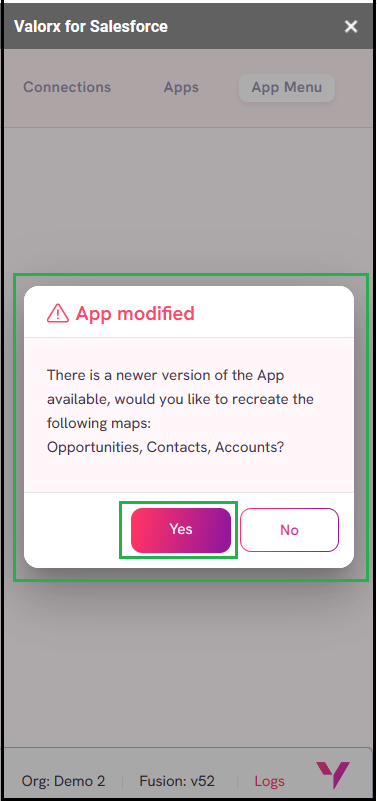
Runtime users will receive an App Modified message when there are any changes made in the App and users need to click on “**Yes**”. It will show all the changes made in the grid maps in the runtime files.
The **App Menu** will open directly when there are no changes made to the App.
#### Enhancements:
**Confirmation Message on Google Drive:** We have improved the theme of the confirmation dialog shown when the app already exists in **Google Drive**.
**Open Sidebar:** The Spreadsheet now includes an "**Open Sidebar**" button, allowing users to open the sidebar directly by clicking on it rather than going through **Extensions** -> **Valorx for Salesforce**. To see the "**Open Sidebar**" button on the Spreadsheet, users must first open Valorx Add-on via the regular Extension menu.
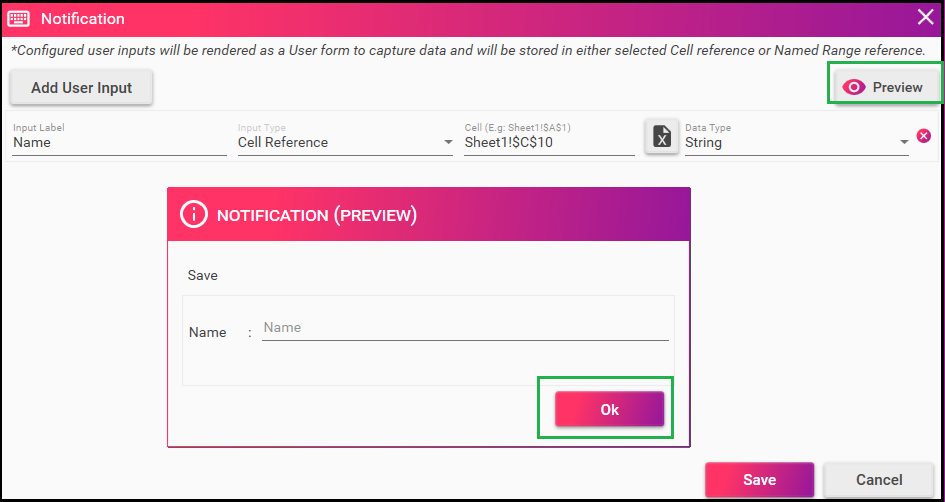
**Notification Task:** The notification task under Workflow and UX has been enhanced which will allow the Design Studio users to provide input which will display the results in a Runtime Excel sheet based on the pre-defined name range or cell location inputs provided.
* Open a workflow from **Workflow and UX** in Design Studio.
* Check-in “**Configure Data Capture**” and open it by clicking on “**Configure Data Capture**”.
* Notification window will open now click **Add User Input**.
* Click **Save**.
* Click **Preview** and provide the inputs and click **Ok**.
* Run the app to display the results as per the inputs provided.
Notification message has been enhanced when “**Configure Data Capture**” is unchecked.