> For the complete documentation index, see [llms.txt](https://docs.valorx.com/llms.txt). Markdown versions of documentation pages are available by appending `.md` to page URLs; this page is available as [Markdown](https://docs.valorx.com/valorx-fusion/versions-and-release-notes/windows/older-versions/mac/version-27.md).
# Aug 23 Release (v27)
### 📢 Announcing the August 2023 Release
This release includes bug fixes for better operation and user experience.
### 🔧 Bug Fixes
* The long-running Macros-related issue is fixed, and the workflow sequence works accurately.
> Long-running Macros were executing in Async mode. As a result, their associated processes were showing unexpected behavior.
>
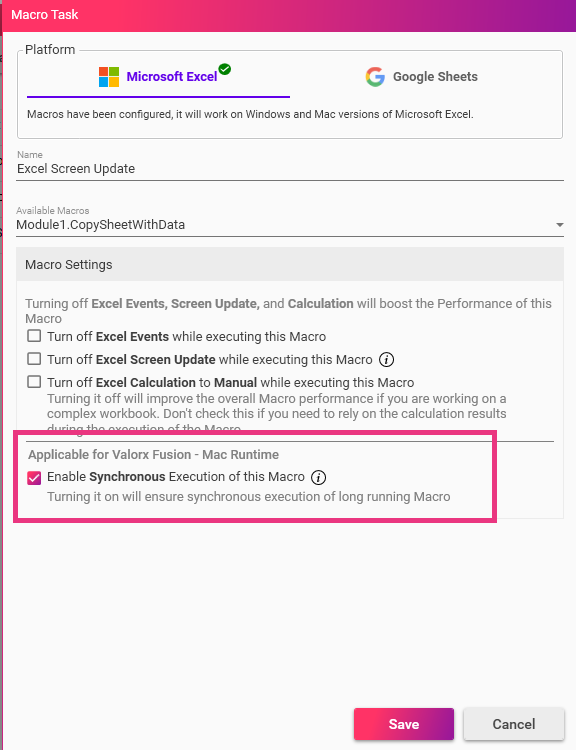
> To resolve this issue, The **Enable Synchronous Execution of this Macro** checkbox is added to the Macro Task screen, as shown in the image below. If the user checks the checkbox, the long-running Macros will execute in the sync mode.
The Enable Synchronous Execution of this Macro checkbox
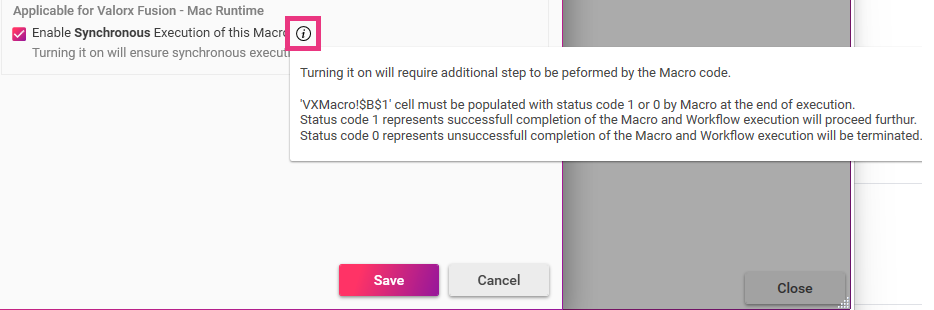
> To activate this feature, the user needs to make some changes in the Macro code. The user can see these changes-related information by clicking on the **Info** icon.
The Info icon shows information about Macro code-related changes.
* The issues related to the Notification's UI are fixed.
> The Button text is visible now.
>
> The Title text is visible now.
* The Save Summary scroll bar works well now.