> For the complete documentation index, see [llms.txt](https://docs.valorx.com/llms.txt). Markdown versions of documentation pages are available by appending `.md` to page URLs; this page is available as [Markdown](https://docs.valorx.com/valorx-wave/release-notes/wave-browser-extension/archived-release-notes/wave-version-15.md).
# May 23 Release (v15)
Announcing **Valorx Wave** – **May 23 Release (V15)**
Valorx Wave is pleased to announce the **May** release note which has a noticeably better user experience. In this release, we have a new feature with the intention of improving the **Sign In** user experience and fixing a few issues.
#### New Features:
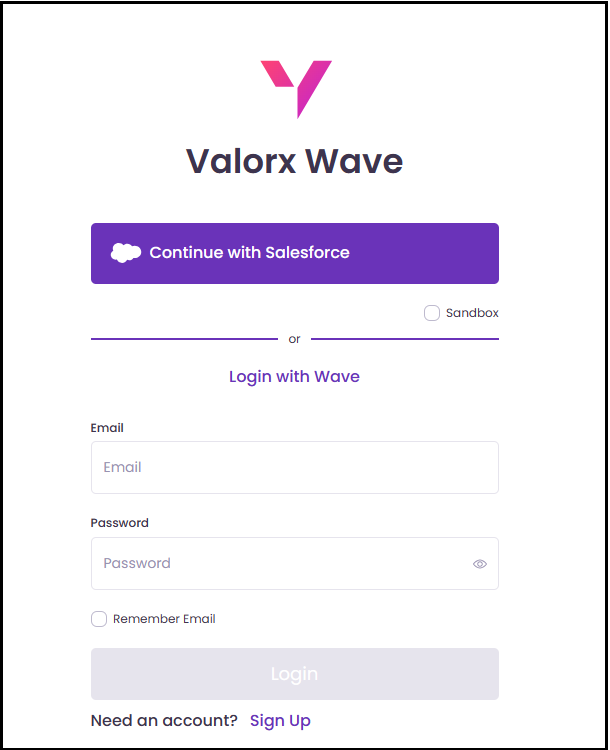
In this release, we have made significant improvements to our **OAuth flow** and introduced a new **Sign In** screen. Upon installing the extension, users will be automatically directed to the new **Sign In** screen.
The **Sign In** screen acts as a centralized platform for all login-related activities, offering users a convenient way to connect with **Salesforce**, **Login with Wave**, connect to a new organization, and sign up, all within a single interface.
After reaching the **Sign In** screen, users can choose how they want to proceed with the login process. Depending on their selection, if they choose to **Continue with Salesforce**, they will be redirected to the Salesforce Authentication using the Connected App.
To facilitate user to login via a Sandbox org, the user can check the environment as **Sandbox** and then click on **Continue with Salesforce** and then will be redirected to the test.salesforce.com URL or they will be redirected to the login.salesforce.com URL by default.
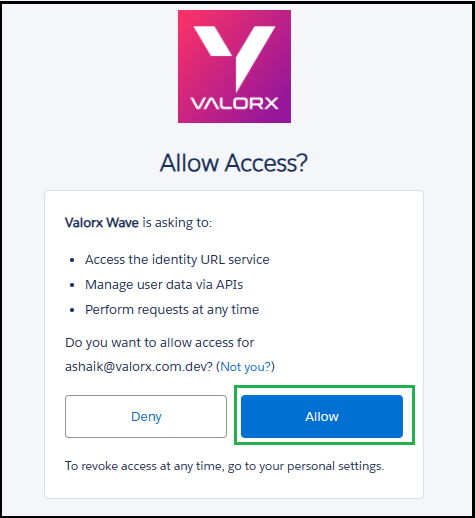
Once the user has been redirected to the **Salesforce Authentication** and they have entered their username and password or **Multi-factor Authentication** (**MFA**) credentials if required, they will proceed to the next stage of the login process. To successfully complete the sign in process the user needs to **Allow** the necessary permissions.
{% hint style="info" %}
**Sign In** screen will be visible to users only when their Salesforce session expires.
{% endhint %}
These updates aim to streamline the login experience for users and provide more flexibility in accessing **Wave**. By eliminating the need for constant browser session logins, users can seamlessly establish a connection to Wave, enhancing their overall user experience.
#### Bug Fixes and Improvements
* The **Save Summary** feature was displaying an incorrect error message related to row numbers when users attempt to save changes to related fields. We have implemented a fix that ensures the error message displayed in the **Save Summary** now accurately reflects the row numbers associated with any issues encountered when saving changes to related fields.
* The **Record Change** dialog for related fields. Users were experiencing inaccuracies in the displayed row indexes, which affected the ability to identify the correct rows impacted by changes. Provided a fix that ensures the displayed row indexes in the **Record Change** dialog now reflect the actual row numbers accurately.
* The size of the **Detail lookup** page in the Related list where users were experiencing an excessively large display of the **Detail lookup** page, causing inconvenience, and impacting the user experience.
* The row indexes are not updated after using the '**Revert all**' option to undo changes. When users make modifications to the data and then utilize the '**Revert all**' option to undo those changes.
* The option for "**Save Changes** “would disappear as soon as the user clicked anywhere else on the screen when users would delete a newly created or cloned record using the delete option in the context menu. The fix ensures that the "**Save Changes**" option remains visible even after users click elsewhere on the screen following the deletion of a newly created or cloned record using the context menu.
* "**Pin the Wave Extension**" popup continues to appear on the **Sign In** screen, even after the Wave extension has been successfully pinned. Provided a fix and "**Pin the Wave Extension**" popup no longer appears on the **Sign In** screen once it is pinned to Wave extension.
* We have actively worked on resolving the issue where the **Filter**, **Condition**, **Sort** & **Mass** **Modifier** overlay is not staying within the designated area of the **Wave** Main page and fixed this issue by ensuring that the overlay remains properly within the designated area of the **Wave** Main page. By fixing this problem, we aim to provide users with a consistent and visually cohesive experience when utilizing the **Filter**, **Condition**, **Sort** & **Mass** **Modifier** functionality.
* Identified and successfully resolved the issue related to the delay in updating the parent record name in the related list this has been resolved.