> For the complete documentation index, see [llms.txt](https://docs.valorx.com/llms.txt). Markdown versions of documentation pages are available by appending `.md` to page URLs; this page is available as [Markdown](https://docs.valorx.com/valorx-wave/release-notes/wave-browser-extension/archived-release-notes/wave-version-17.md).
# Jun 23 Release (v17)
\
Introducing **Valorx Wave** **– June 23 Release (V17)**
This release brings a host of improvements, including new features and enhancements that address various issues, all aimed at streamlining the user experience for optimal performance.
#### New Features
Valorx Wave's latest release introduces two significant features: a **Dashboard** and a **Profile Card**.
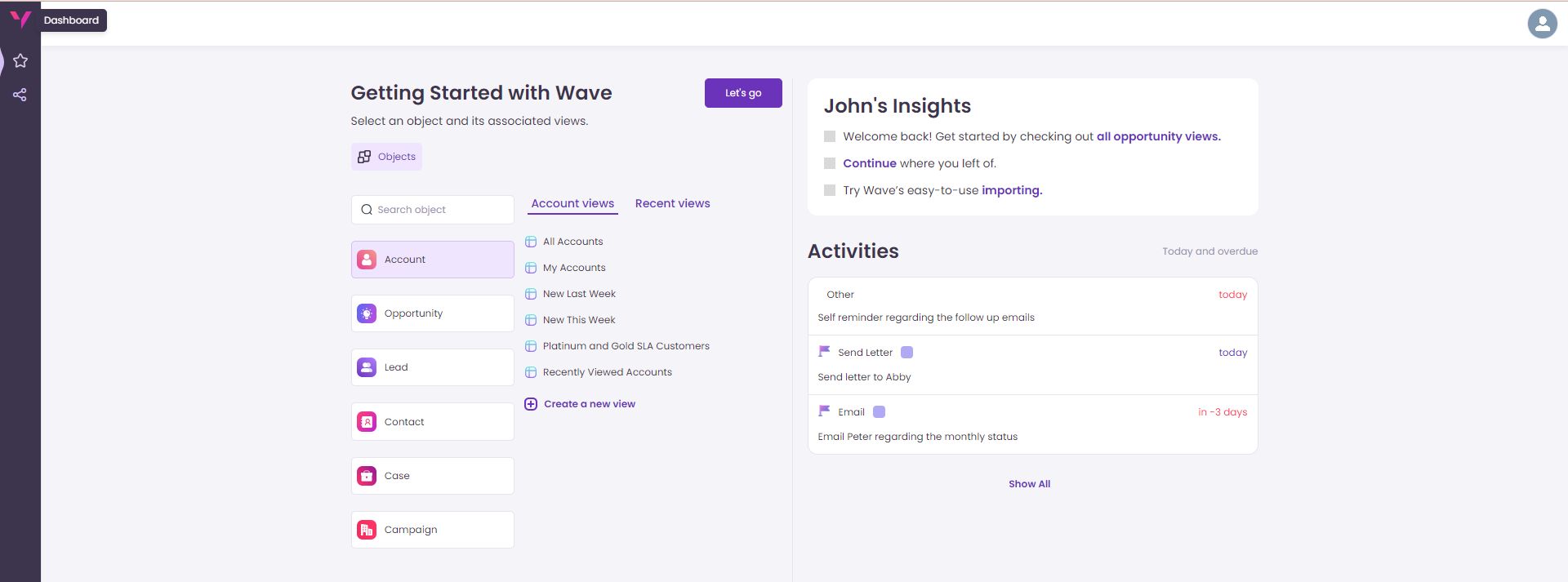
**Dashboard**: It is designed to provide users with comprehensive information on objects, views, insights, and activities. The dynamic dashboard gathers all important data in one place, providing smooth navigation with a simple click.
#### What's Included in Our Dashboard? 🤔
1. **Select an Object**: The Dashboard in Valorx Wave provides users with a convenient way to view and search for specific objects. For first-time users, it initially displays the seven common objects and their Salesforce views. Users can either click "**Let's Go**" or use the search function to find the desired object.
For returning users it provides a list of custom views and recently accessed views, making it easier for users to quickly access the frequently used items. Additionally, clicking "**Let's Go**" takes the user to the last visited view, ensuring a seamless and intuitive experience, and enhancing navigation within Valorx Wave for smooth and efficient usage.
2. **Create a New View**: This feature mirrors the "**Create new view**" option available on our **Grid**. Users can effortlessly create custom views from the Dashboard with just a single click.
3. **User Insights**: The insight section will cater to users with different account types such as admin & standard user and know their current record usage.
4. **Activities**: The Dashboard now provides users with a convenient way to access and monitor Today & Overdue activities. This feature ensures users would always know their today and past activities. Navigating to a specific activity is made effortless as users can simply click on their desired activity directly from the dashboard.
#### Profile Card
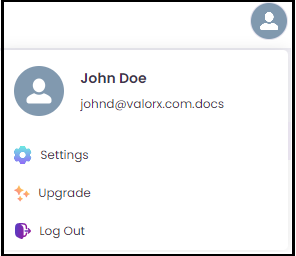
The new **Profile Card** is a key feature that presents users with a concise and informative display of their profile information. With the integration of **Settings**, users now have easy access to options like **Upgrade** and **Logout**. It's all about making account management simpler and more efficient!
#### Enhancements:
**Custom Record Loading:** We've improved the user experience! Now, when users click on the "**Load More**" option in the footer section, they have the flexibility to choose how many records they want to load: 200, 400, 1000, or all records.
Simply selecting one of these options will load the corresponding number of additional records. For those who have specific requirements, clicking on the "**Custom**" button allows them to enter a custom value for loading records.
When users click on "**All Records**," it displays a message saying, "*Please be patient while records are loaded,*" ensuring they stay informed during the process. It's all about giving users more control and a smoother experience!
#### Bug Fixes and Improvements
* The issue with the lack of support for operators in filters within standard views has been resolved.
* Previously, encountering errors in Wave due to dynamic date literals in the standard Salesforce view is now fixed.
* Users can now view their favorite views correctly without encountering the loading problem.
* With the recent update, newly registered users can now effortlessly access the start and end dates of their billing cycle.
* Fixed the settings screen, it accurately displays the license number.
* The issue when users did not find any results when they searched about an activity, is resolved.