> For the complete documentation index, see [llms.txt](https://docs.valorx.com/llms.txt). Markdown versions of documentation pages are available by appending `.md` to page URLs; this page is available as [Markdown](https://docs.valorx.com/valorx-wave/release-notes/wave-browser-extension/archived-release-notes/wave-version-26.md).
# Jan 24 Release (v26)
## 📢 Announcing the January Release
Happy New Year!🎉 As we celebrate the dawn of 2024, we are thrilled to kick off the year with a bang and present to you our January Release Notes. Along with addressing some important bug fixes, this release comes up with a complete redesign of the **Wave Ribbon** in the Views Screen.
## ✨ Enhanced UI / UX Design
### The All-New Wave Ribbon
We are delighted to introduce the newly upgraded Wave Ribbon 🌟. This improvement is meticulously designed to ensure not only improved functionality but also the infusion of elegant aesthetics for an enriched user experience.
Wave Ribbon
**Introducing the Object Bar**
> No more searching for popular objects in the Search bar or opening the Home screen to select one. Users can now directly access their recently used objects right from the Wave Ribbon in the Views screen😊.
Object Bar
* Users can select another object anytime to open the Views of that object.
**Revised Toolbar**
> We've refined the Toolbar to ensure that users' experience interacting with their data is not just efficient but downright enjoyable 🥳.
The New Toolbar
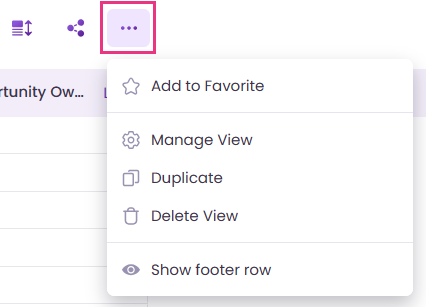
**More Options**
> The More Options menu has been greatly reinforced, and it now supports multiple functionalities together in a single place. In addition to the 'Show footer row' option, It now also enables the users to
>
> * Add View to favorite / Remove View from favorite
> * Manage View (allows renaming the view and adding description)
> * Duplicate
> * Delete View
More Options
***
### Save Summary
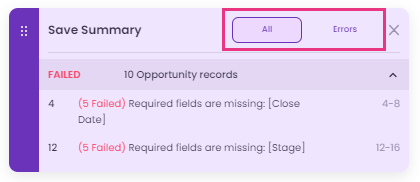
> The Save Summary notification box appearing when saving any changes, has undergone a design change. It now comes with two buttons: **All** and **Errors**.
Save Summary notification
* **All:** By clicking the 'All' button, the Views screen displays all records, including the rows containing errors.
* **Errors:** By clicking the 'Errors' button, the users can exclusively view only those rows that contain errors. This facilitates better visibility and addressing of errors.
## 🔧 Bug Fixes
* The Admin users logging into Wave using the 'Login with Valorx' option can now accurately view the number of licenses allotted to various orgs.
* The problems faced in regard to the effective **display of error information** and the **position** of the 'Save Summary' floaty have been resolved.
* Various issues with the functioning of the Mass Modifier and Import features have been streamlined.
* Save operation now works accurately after modifying the 'Time' values in the Record Detail and Lookup Detail pages.
***
{% hint style="info" %}
**Note:** We have updated the View Search feature in the Wave Ribbon, and as part of this improvement, the Advanced Search functionality is no longer available.
{% endhint %}