> For the complete documentation index, see [llms.txt](https://docs.valorx.com/llms.txt). Markdown versions of documentation pages are available by appending `.md` to page URLs; this page is available as [Markdown](https://docs.valorx.com/valorx-wave/release-notes/wave-browser-extension/archived-release-notes/wave-version-28.md).
# March 24 Release (v28)
## 📢 Announcing the March Release
We are excited to announce the latest updates and enhancements to our application. This release focuses on enhancing performance for **filtering** and **exporting data** while addressing several critical **bug fixes**. Our goal is to provide you with the best possible user experience, and we believe these changes will make a significant impact. Below, you will find a detailed summary of what's new and improved in this version.
***
## ✨ Enhanced UI / UX Design
### Filter
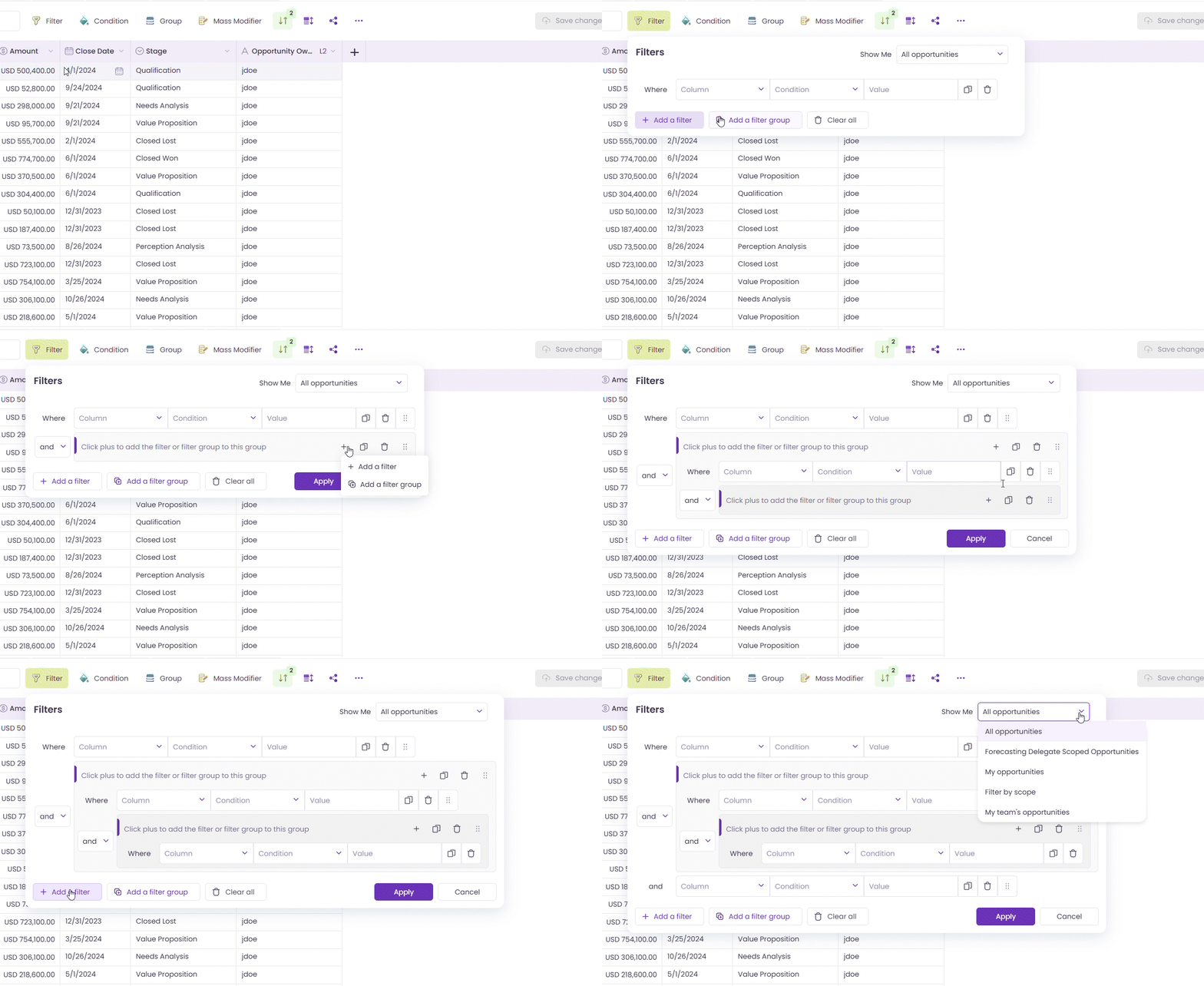
We’re thrilled to unveil our enhanced filtering capabilities, now featuring **filters** and **filter groups**! Users can now easily apply filters and create grouped filters for a more streamlined experience.
Filter and Filter group
### Export Data
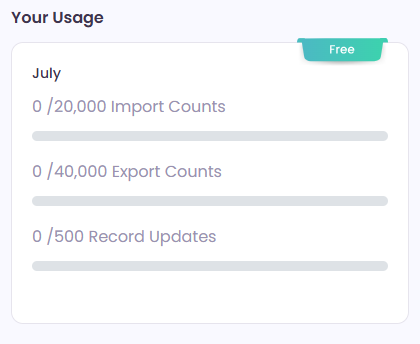
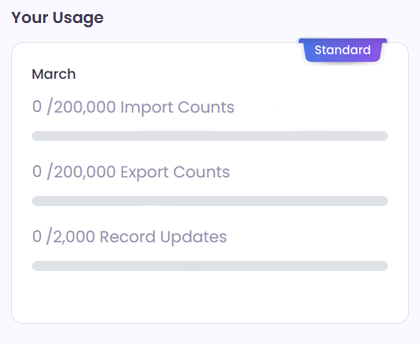
Introducing Wave managed **download limits** tailored for each subscription tier:
Free User
Standard User
* **Free** tier users now enjoy a generous monthly limit of **40k** downloads.
* **Standard** tier subscribers can take advantage of up to **200k** downloads per month.
* **Pro** tier members benefit from **unlimited** monthly downloads, unlocking boundless possibilities!
{% hint style="info" %}
You can check your download usage by going to Settings and selecting General. Pro users enjoy unlimited monthly downloads, so usage details won't be displayed for them.
{% endhint %}
***
## 🔧 Bug Fixes
* The import screen was not displaying correctly during **Smart Import**. After clicking "Preview and Import," the imported data and import button would disappear, though the import floaty remained visible. This issue has been resolved. Users can now see the imported data and the import button, allowing smooth data import.
* Users were **unable to create new views** using the "Add New" button or by duplicating standard/shared views. This issue has been resolved. Users can now create new custom views without encountering validation errors.
* Users encountered "**one or more validation errors**" when adding a related object to a view. Users can now successfully add related objects to views without encountering validation errors.
* Users were unable to **log in** with a Valorx account. Now, user can successfully log in with a Valorx account.
* Users with **read-only access** to shared views can now create new views using the **Field Picker** as expected.
* **Field picker** header issue fixed. Views now correctly include fields belonging to the selected object.
* Resolved issue where the **color picker** in the color bar wasn't visible in the toolbar and header action. Now visible on clicking the color icon.
* Fixed issue where **grid view layout** changed when dragging Boolean values horizontally. Now, the Save button appears correctly after making changes in the view.
* Fixed issue where the **field picker was blocked** when attempting to open two field pickers simultaneously. Now, the field picker functions correctly.
* Resolved issue where users encountered an **infinite loader** when logging in using a different organization after their session expired. Users can now seamlessly access Wave after session expiration.
* Fixed issue where **picklist values** were not displayed when changing them on the detailed lookup page. Picklist values now correctly appear on the detailed lookup page for seamless editing.
* Resolved issue where users encountered a "**required field missing**" error even after adding a value to the field. Fields now accept values properly without displaying errors erroneously.
* Addressed issue where **multiple loaders** appeared in Wave. Now, only one loader displays as expected for improved user experience.
* Addressed issue where **date and date-time data type** fields did not display values in the grid, but after exporting records, date and date-time values correctly appeared in Excel and CSV files. Data now aligns consistently between the grid and exported files.
* Fixed **console error** encountered while cloning records with date-time data type fields when attempting to export data. The issue no longer occurs, ensuring smoother export operations.
* Improved user experience while **exporting large datasets**. Now, after loading all records, users are provided with a proper message during the file conversion to Excel or CSV format. This enhancement prevents confusion when the screen appears unresponsive.
* Resolved issue where **API names** were displayed in Excel instead of corresponding values from dependent picklist fields.
* Fixed issue where the '**Save custom view**' popup did not appear after syncing a Report with applied filters. Previously, changes made to filters were saved but required a hard refresh to reset. Now, a popup appears prompting users to create a custom view after applying filters to a Report. This ensures that filters are properly reset upon creating a custom view.
* Resolved issue where **changes reverted** on the save button after renaming a view. Changes now properly reflect on the save button after renaming views.
* Fixed issue where **describe call failed** and 'Resource does not exist' error appeared after logging into a second org.
* Resolved issue where **cloning did not** work for Case and Lead objects when the field was present.
* Fixed issue where **views were not being removed** from the recent views sidebar after deletion.
* Resolved issue where selected **picklist values were displaying API names** instead of labels in the grid.
* Resolved continuous **loader issue** in the field picker. Now the "Create View" button is greyed out appropriately, and the cancel button functions correctly.
***