# May 24 Release (v30)

## 📢 <mark style="color:blue;">Announcing the May Release</mark>

We are thrilled to announce the latest update to our application, packed with exciting new features and important bug fixes. In this release, we've introduced powerful new functionalities to enhance your workflow and addressed several critical issues to improve your overall experience.

***

## ➕ <mark style="color:blue;">What's New?</mark>

### <mark style="color:purple;">Enhanced Access Level</mark>

We are thrilled to announce a new feature in our **access control system**, designed to provide greater flexibility and control. Previously, we had two types of users: **Admin** and **Standard**. Now, we are excited to introduce our new user role: **Designer**.

<div><figure><img src="https://2237973035-files.gitbook.io/~/files/v0/b/gitbook-x-prod.appspot.com/o/spaces%2F65f4C4H8V5e0YV342mwp%2Fuploads%2FOpAexXmHzXxownCdGjEn%2FAdmin.png?alt=media&#x26;token=2f15bfdb-aff7-4bca-be14-1d4614f60a12" alt=""><figcaption><p>Admin role</p></figcaption></figure> <figure><img src="https://2237973035-files.gitbook.io/~/files/v0/b/gitbook-x-prod.appspot.com/o/spaces%2F65f4C4H8V5e0YV342mwp%2Fuploads%2FsqWsjqlplvFUaWlaw3PB%2FDesigner.png?alt=media&#x26;token=82877462-d2fb-42b5-8e7f-ed1463f19266" alt=""><figcaption><p><strong>Designer role</strong></p></figcaption></figure> <figure><img src="https://2237973035-files.gitbook.io/~/files/v0/b/gitbook-x-prod.appspot.com/o/spaces%2F65f4C4H8V5e0YV342mwp%2Fuploads%2F1Q08r0spR7c1XLZHKNNn%2FStandard.png?alt=media&#x26;token=b80b8fb7-c3c0-45fb-8a8b-d41126d15f8b" alt=""><figcaption><p>Standard role</p></figcaption></figure></div>

> **Designers** can now create and manage views with global accessibility. They have the power to:
>
> * Create global views accessible to all users with granted access
> * Edit and customize views
> * Restrict viewers from adding new records
> * Add or rearrange fields
> * Clone views
> * Assign views to specific Salesforce profiles

**Here's a summarized table of the actions for each role:**

<table data-full-width="false"><thead><tr><th width="377">Action</th><th>Admin</th><th>Designer</th><th>Standard</th></tr></thead><tbody><tr><td>Promote regular users to designers</td><td><mark style="color:green;">Yes</mark></td><td><mark style="color:red;">No</mark></td><td><mark style="color:red;">No</mark></td></tr><tr><td>Invite new users to the product</td><td><mark style="color:green;">Yes</mark></td><td><mark style="color:green;">Yes</mark></td><td><mark style="color:green;">Yes</mark></td></tr><tr><td>Assign design rights or view rights to users</td><td><mark style="color:green;">Yes</mark></td><td><mark style="color:green;">Yes</mark></td><td><mark style="color:red;">No</mark></td></tr><tr><td>Edit views, restrict viewers, and manage fields</td><td><mark style="color:green;">Yes</mark></td><td><mark style="color:green;">Yes</mark></td><td><mark style="color:red;">No</mark></td></tr><tr><td>Customize their own view preferences</td><td><mark style="color:green;">Yes</mark></td><td><mark style="color:green;">Yes</mark></td><td><mark style="color:green;">Yes</mark></td></tr><tr><td>Highlight role with an icon in profile/setting</td><td><mark style="color:green;">Yes</mark></td><td><mark style="color:green;">Yes</mark></td><td><mark style="color:green;">Yes</mark></td></tr><tr><td>Assign views to specific Salesforce profiles</td><td><mark style="color:green;">Yes</mark></td><td><mark style="color:green;">Yes*</mark></td><td><mark style="color:red;">No</mark></td></tr><tr><td>Access views based on permissions set by designers</td><td><mark style="color:green;">Yes</mark></td><td><mark style="color:green;">Yes</mark></td><td><mark style="color:green;">Yes</mark></td></tr></tbody></table>

*\*Note: Assigning views to specific Salesforce profiles will be available in the next release.*

***

### <mark style="color:purple;">Permission</mark>

We are excited to announce the addition of our new Permissions feature! This feature is exclusively accessible to **Admins** and **Designers**, while Standard users will not have access to the **Permissions** tab. Admins and Designers can now manage **view access**, **add/clone records**, **delete records**, **create reports**, and **import files** for **Standard users**, ensuring better control and customization of user capabilities.

<figure><img src="https://2237973035-files.gitbook.io/~/files/v0/b/gitbook-x-prod.appspot.com/o/spaces%2F65f4C4H8V5e0YV342mwp%2Fuploads%2FBhhpAfEXGKZY0D15geNZ%2FWaveE%20-%20Permission.gif?alt=media&#x26;token=44ea536c-0fae-4197-9bda-6a9591fcc9c8" alt=""><figcaption><p>Permission</p></figcaption></figure>

#### <mark style="color:purple;">Views</mark>

**Disabling** Views will restrict Standard users to only seeing Share Views, Salesforce Views, and Global Views, with **My Views(Custom Views) no longer accessible**.

**Enabling** Views will allow Standard users to access My Views, Share Views, Salesforce Views, and Global Views. Additionally, it provides more control options, permitting Standard users to add new views and edit fields.

> **Enabling Add a View**:
>
> * [x] Allows Standard user to **create and add a new views**.
>
> **Enabling Edit fields**:
>
> * [x] **Allow Add Field**: Enables Standard user to add a new fields to the view.
> * [x] **Allow Rearrange Field**: Allows Standard user to rearrange the fields within the view.
> * [x] **Allow Remove Field**: Permits user to remove fields from the view.

#### <mark style="color:purple;">**Add/Clone Record**</mark>

**Enabling** "Add/Clone record" allows Standard users to **add new records** or **clone existing records** within the views.

#### <mark style="color:purple;">**Delete Record**</mark>

**Enabling** "Delete record" allows Standard users to **remove any record** within the views.

#### <mark style="color:purple;">Report</mark>

**Enabling** "Report" allows Standard users to create reports. Disabling this option will hide the Report button and prevent users from creating reports.

#### <mark style="color:purple;">Import</mark>

**Enabling** "Import" allows Standard users to import records. Disabling this option will hide the Import button and prevent users from importing records.

***

### <mark style="color:purple;">Global Views</mark>

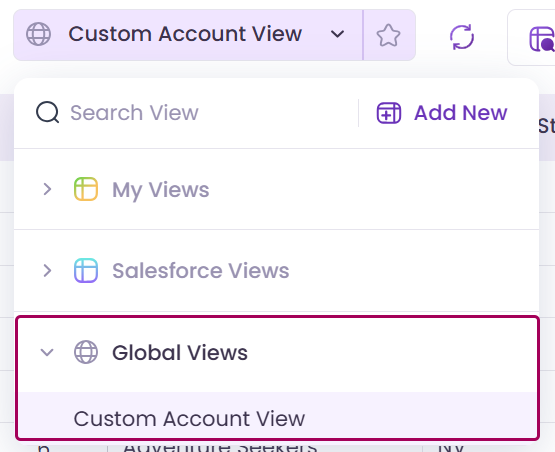
We are excited to introduce a powerful new feature: **Global Views**. As an org **Admin** or **Designer**, you now have the ability to create a new type of view called "Global View". Global Views are accessible to everyone within your organization, ensuring that important data and perspectives are shared seamlessly across your entire team.&#x20;

This feature enhances collaboration and ensures that all users have access to the same vital information, streamlining workflows and improving productivity.

<div align="left"><figure><img src="https://2237973035-files.gitbook.io/~/files/v0/b/gitbook-x-prod.appspot.com/o/spaces%2F65f4C4H8V5e0YV342mwp%2Fuploads%2FshcVuDzhm8625w2zbqYX%2FGlobal%20Views.png?alt=media&#x26;token=21c05b60-6435-4be5-b847-1d1f552398d1" alt="" width="278"><figcaption><p>Global Views</p></figcaption></figure></div>

<figure><img src="https://2237973035-files.gitbook.io/~/files/v0/b/gitbook-x-prod.appspot.com/o/spaces%2F65f4C4H8V5e0YV342mwp%2Fuploads%2FDv7uPfUPYdOyRxinmi5Q%2FGlobal%20Views.gif?alt=media&#x26;token=06810fa2-7d31-4ed9-a397-ff3bcdf24092" alt=""><figcaption></figcaption></figure>

> Only "Custom Views" under My Views can be shared or made into Global Views. User can only choose **one option**: either Global View or Shared View. Users cannot select both.

When a view is set to Global View or Share View, you can manage access by clicking on "**Manage Access**." Here, you can **assign the view to specific users**. This is how you grant access to the view to other users.

<figure><img src="https://2237973035-files.gitbook.io/~/files/v0/b/gitbook-x-prod.appspot.com/o/spaces%2F65f4C4H8V5e0YV342mwp%2Fuploads%2FrYLGoEA9DPT7OyEaRmAp%2FValorx%20Wave%20-%20Global%20View%20Manage%20Access.gif?alt=media&#x26;token=c7a9b3ac-bc59-4319-8d74-29b0c0d69152" alt=""><figcaption><p>Manage access of the view</p></figcaption></figure>

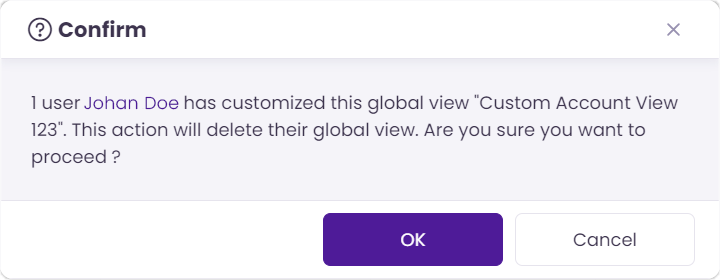
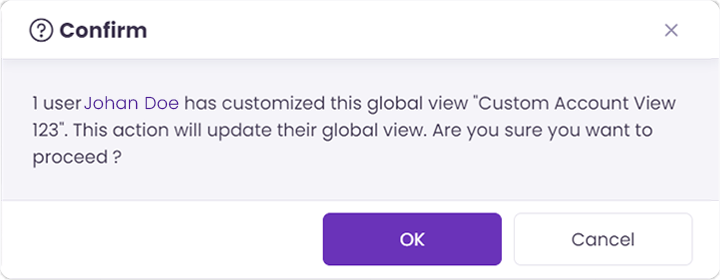
If the **Designer** or **Admin** tries to **update** or **delete** a global or share view that a Standard user has **modified**, a **popup message will appear**. This message will inform the Designer/Admin about the modifications made by the Standard user and ask for **confirmation to proceed** with the update or deletion of the view.

Below is the confirmation popup message that will be displayed when a Designer or Admin attempts to delete or update a view that has been modified by a Standard user:

<div><figure><img src="https://2237973035-files.gitbook.io/~/files/v0/b/gitbook-x-prod.appspot.com/o/spaces%2F65f4C4H8V5e0YV342mwp%2Fuploads%2FfzdPeNAxPBrk47bfdsPN%2FV30%20-%20Confirm%20Delete%20Message.png?alt=media&#x26;token=b2351da4-471f-4e35-9fdf-66b2ca5f283c" alt="" width="360"><figcaption><p>Delete the view confirmation message</p></figcaption></figure> <figure><img src="https://2237973035-files.gitbook.io/~/files/v0/b/gitbook-x-prod.appspot.com/o/spaces%2F65f4C4H8V5e0YV342mwp%2Fuploads%2FRxKkh3IAwmq1ZROms29k%2FV30%20-%20Confirm%20Update%20Message.png?alt=media&#x26;token=45d40069-fe51-4b4e-934e-b63df4f82699" alt="" width="360"><figcaption><p>Update the view confirmation message</p></figcaption></figure></div>

#### <mark style="color:purple;">**Global Views vs. Share Views**</mark>

<table><thead><tr><th width="171">Feature</th><th>Global Views</th><th>Share Views</th></tr></thead><tbody><tr><td><strong>Definition</strong></td><td>A global view has no concept of owners. Designers can assign global views to other team members.</td><td>A custom view has a concept of ownership. It can be shared with other team members.</td></tr><tr><td><strong>Who Can Access</strong></td><td>Designers/Admins can create and go to the team members tab to share.</td><td>Individuals with whom the view is shared. Owners can go to the team members tab to share.</td></tr><tr><td><strong>Deletion</strong></td><td>All Designers and Admins can delete and modify the Global View.</td><td>Owners can delete or modify their shared views.</td></tr><tr><td><strong>Modification Notification</strong></td><td>Standard users will be notified of changes made by admins/designers.</td><td>Not applicable.</td></tr><tr><td><strong>Personalized Copy</strong></td><td>Standard users will have a personalized copy created internally when they make changes.</td><td>Not applicable.</td></tr><tr><td><strong>Duplicate View</strong></td><td>Standard users can create a personalized custom view.</td><td>Not applicable.</td></tr><tr><td><strong>Overwrite Notification</strong></td><td>Admins/designers can choose to overwrite changes made by standard users with a confirmation message.</td><td>Not applicable.</td></tr></tbody></table>

***

## 🔧 <mark style="color:blue;">Bug Fixes</mark>

* User having an issue when creates a new view from the dashboard, the system redirects to the wrong view. Now, the user will be correctly redirected to the newly created view.
* Clicking the create button on the record page floaty with no favorite views previously caused a continuous loader by redirecting to the Wave view. Now, the create button correctly redirects to the appropriate view without causing a continuous loader, and an error message is displayed if the view cannot be loaded.
* Users without report permissions could still access reports from the floaty. This has been resolved, and users without report permissions can no longer access reports from the floaty.
* A toast message confirming the changes was not shown when a user clicked on "Apply Changes" in the Permissions settings. Now, a toast message will be displayed to confirm the changes.
* Previously, removing all view permissions for a standard user resulted in the feedback section in the sidebar showing a blank page. This issue has been resolved, and the feedback section now correctly redirects to the appropriate feedback page, even when view permissions are removed.
* For lookup fields, a textbox is now displayed for conditions such as "contains," "does not contain," and "starts with" in both Filter and Conditional Formatting. This update replaces the previous lookup selector with a textbox for these specific conditions.
* When trying to add more objects, they were not being added to the ribbon UI. Now, when an object is selected from the object bar, it should be added to the ribbon UI as expected.
* Fixed issue where the wrong message was displayed in the snack bar, and the field picker was not closing. Now, an appropriate error message will be shown, and the field picker will close as expected.
* Adding the Contact field in Opportunities caused the record color to incorrectly show as blue after saving. This issue has been resolved; the record color will no longer display as blue after saving.
* Fixed issue where records were not displayed when the 'is not empty' condition was applied on Date in the Header filter. Now, records will properly show when this condition is applied in the Header filter.
* After using Copy + Paste, fiscal period, time, and date-time records were not displaying correctly in Wave. This issue has been resolved, and records will now appear as expected.

***