> For the complete documentation index, see [llms.txt](https://docs.valorx.com/llms.txt). Markdown versions of documentation pages are available by appending `.md` to page URLs; this page is available as [Markdown](https://docs.valorx.com/valorx-wave/release-notes/wave-browser-extension/wave-version-47.md).
# January 26 Release (v47)
This release focuses on maintaining a consistent and familiar Wave experience across products. **Wave Browser Extension v47** introduces a refreshed Wave Settings experience, improving clarity and navigation through UI-focused enhancements. In addition, this release brings feature alignment with **Wave Embedded v18**, ensuring both products share the same look, feel, and capabilities.
***
## Release Highlights :tada:
This update introduces the most impactful improvements in this release, designed to enhance how you work and get more value from the product.
### Wave Settings Experience Redesign
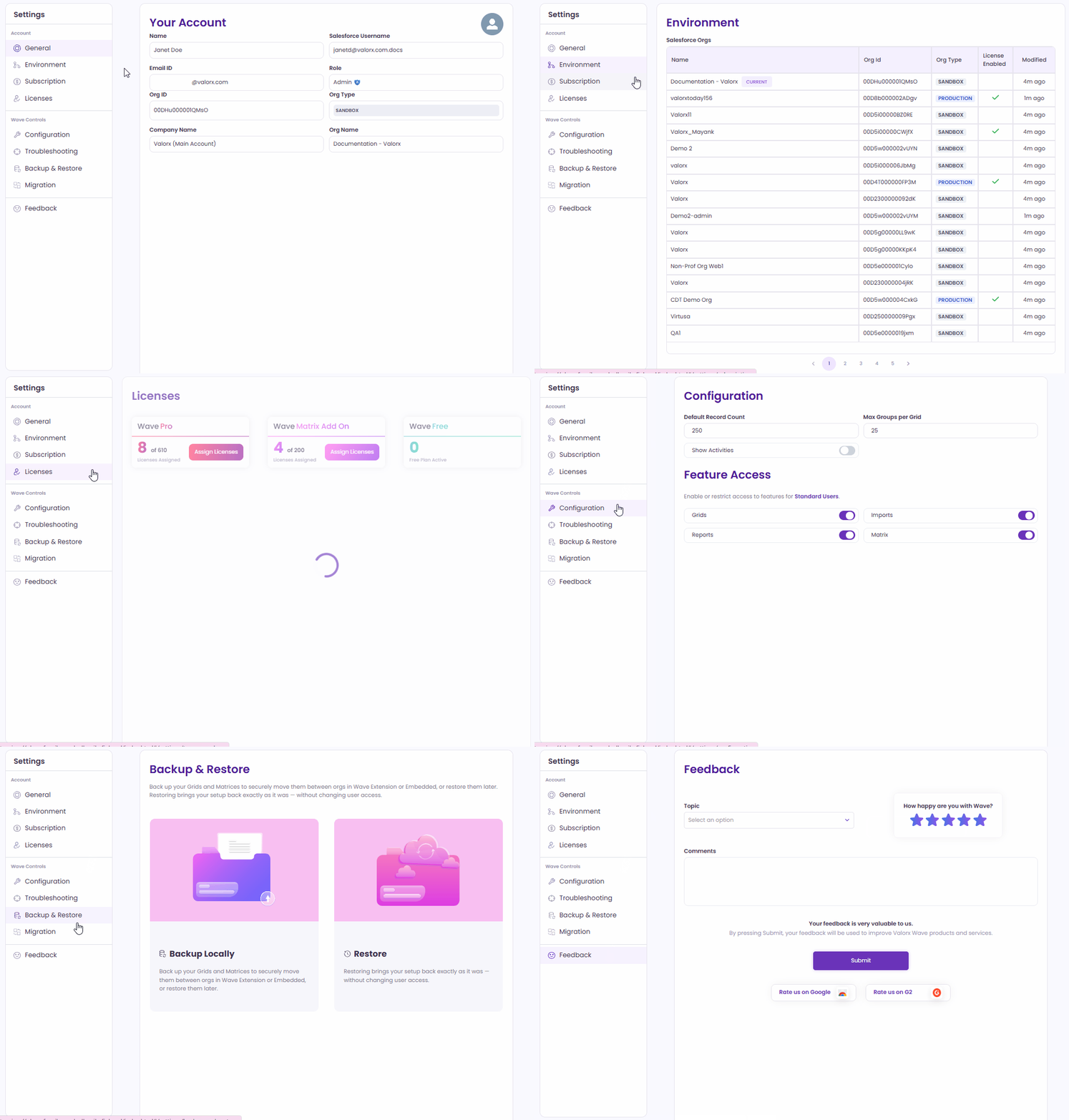
We’ve refreshed and reorganized the **Wave Settings** experience to make it cleaner, more intuitive, and easier to navigate. This update focuses on UI improvements and better information clarity, with minimal functional changes.
The Wave Settings are now structured into clearer sections and subsections, as outlined below:
#### What’s Changed
**Account Settings**
* **General:** All values are now read-only
* **Environment:** Removed *Active* column; added *Modified* column to show last updates
* **Subscription:** UI update only
* **Licenses:** New pagination style (no functional change)
**Wave Controls**
* **Configuration:** Now a standalone section (previously under Advanced); *Apply* button removed
* **Troubleshooting:** Now a standalone section (previously under Advanced); UI update only
* **Backup & Restore:** No changes
* **Migration:** Minor UI updates only
**Feedback**
* New button to rate **Valorx Wave on G2**
* New button to rate the **Wave Chrome Extension** on Google
Find out more about our newly redesign Settings screen [here](/valorx-wave/wave-admin-and-control/wave-settings.md).
Wave Browser Extension Settings Screen
### Enhanced Related List Experience
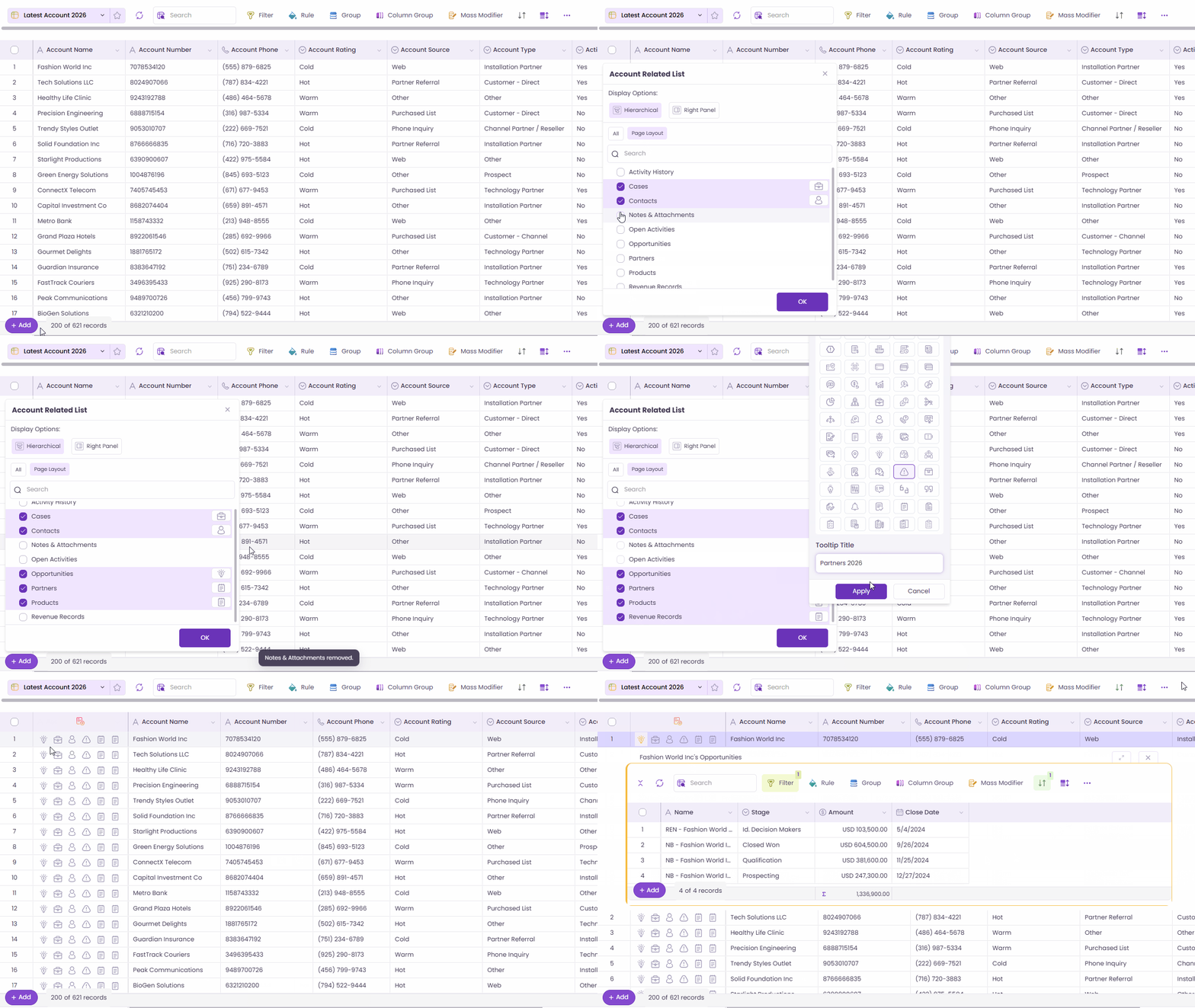
We’ve improved the Related List experience in Wave Grid to make it clearer, more flexible, and easier to use for both Designers and Runtime users.
#### What’s new:
* **Full-screen view:** Open related lists in a full-screen overlay for better focus and visibility.
* **More related lists:** Designers can now add up to **6 related lists** (previously 4).
* **Easy reordering:** Drag and drop related lists to arrange them in your preferred order.
* **Helpful tooltips:** Add tooltips to related lists to give users more context at a glance.
These updates help keep related data organized and easier to work with—so you can focus on what matters.
Related List
### Grid Field Configuration
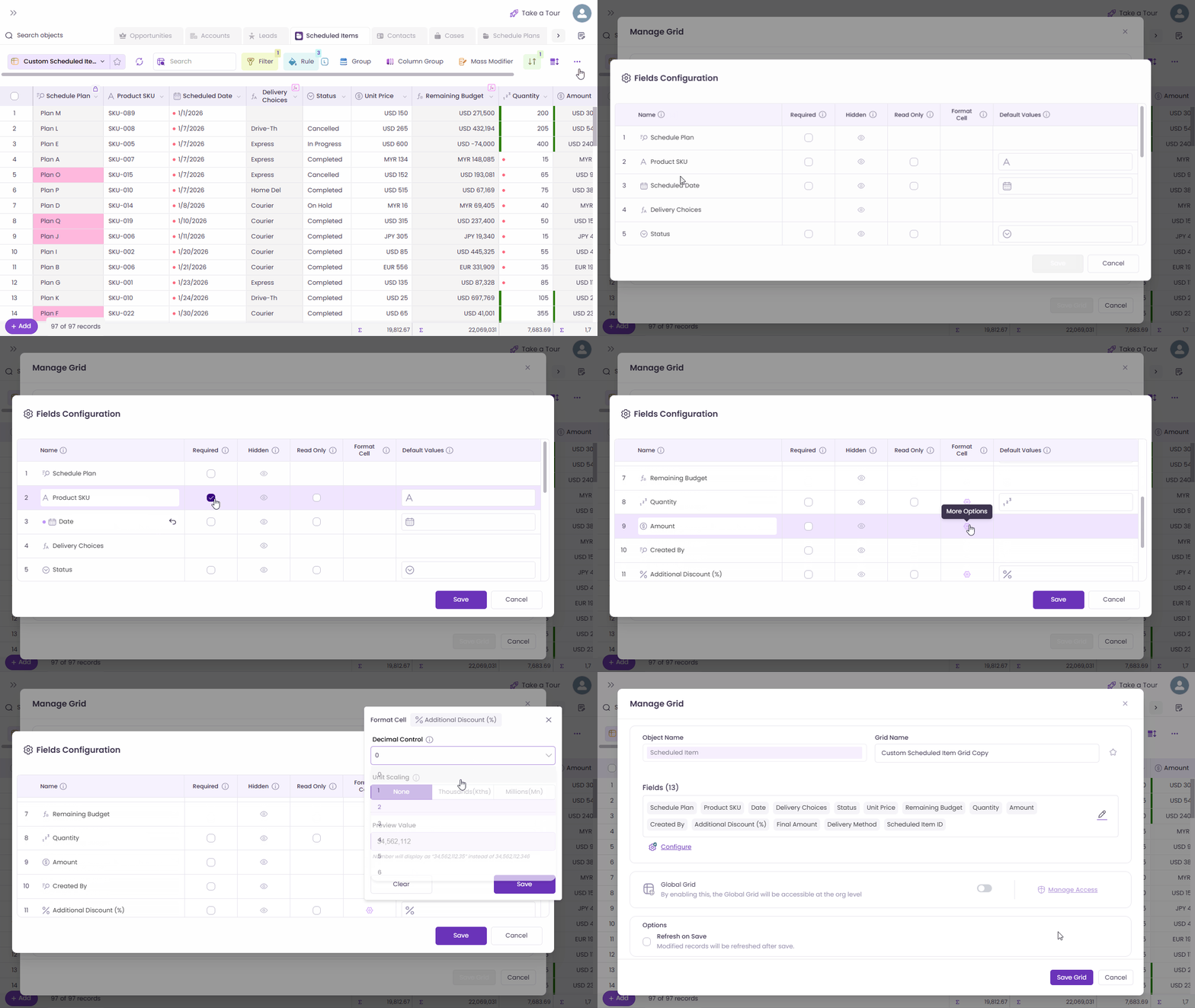
The Grid Field Configuration experience has been upgraded to give Designers more control over how columns appear and behave in Wave Grid—while keeping Salesforce data intact.
#### What’s new:
* **Rename columns:** Update column labels (for example, *Account Name* → *Company Name*) without changing the Salesforce field name. The new label appears consistently across filters, rules, grouping, sorting, and more.
* **Required fields:** Mark fields as mandatory during data entry. Users can’t save records with empty required fields.
* **Hide columns:** Hide columns from the grid view while keeping them available for filters, rules, and sorting. Hidden columns can be restored easily.
* **Read-only fields:** Make columns non-editable, even if users have edit access in Salesforce.
* **Cell formatting:** Control how numeric values are displayed, including decimal precision and unit formatting (K, Mn), without changing the actual data.
* **Default values:** Set default values for new records across multiple field types to speed up data entry.
These enhancements make grids more flexible, consistent, and easier to use.
Grid Field Configuration
### User Queues Support
Wave Grid now supports filtering records where the **Owner** is either the **logged-in user** or a **queue the user belongs to**, providing a more complete and relevant view of assigned records.
#### Key Improvements
* A new **Owner filter option** appears for objects that support queues.
* Automatically includes records owned by **queues the logged-in user is a member of**.
* Supports **first-level queues only**.
* Filter selection is **persisted** for future sessions.
* Available only for objects that support queue ownership.
This enhancement ensures users see all records they are responsible for, including those assigned through queues, improving visibility and reducing manual filtering.
Owner & Queue-Based Filtering
### Vertical Measures in Matrix
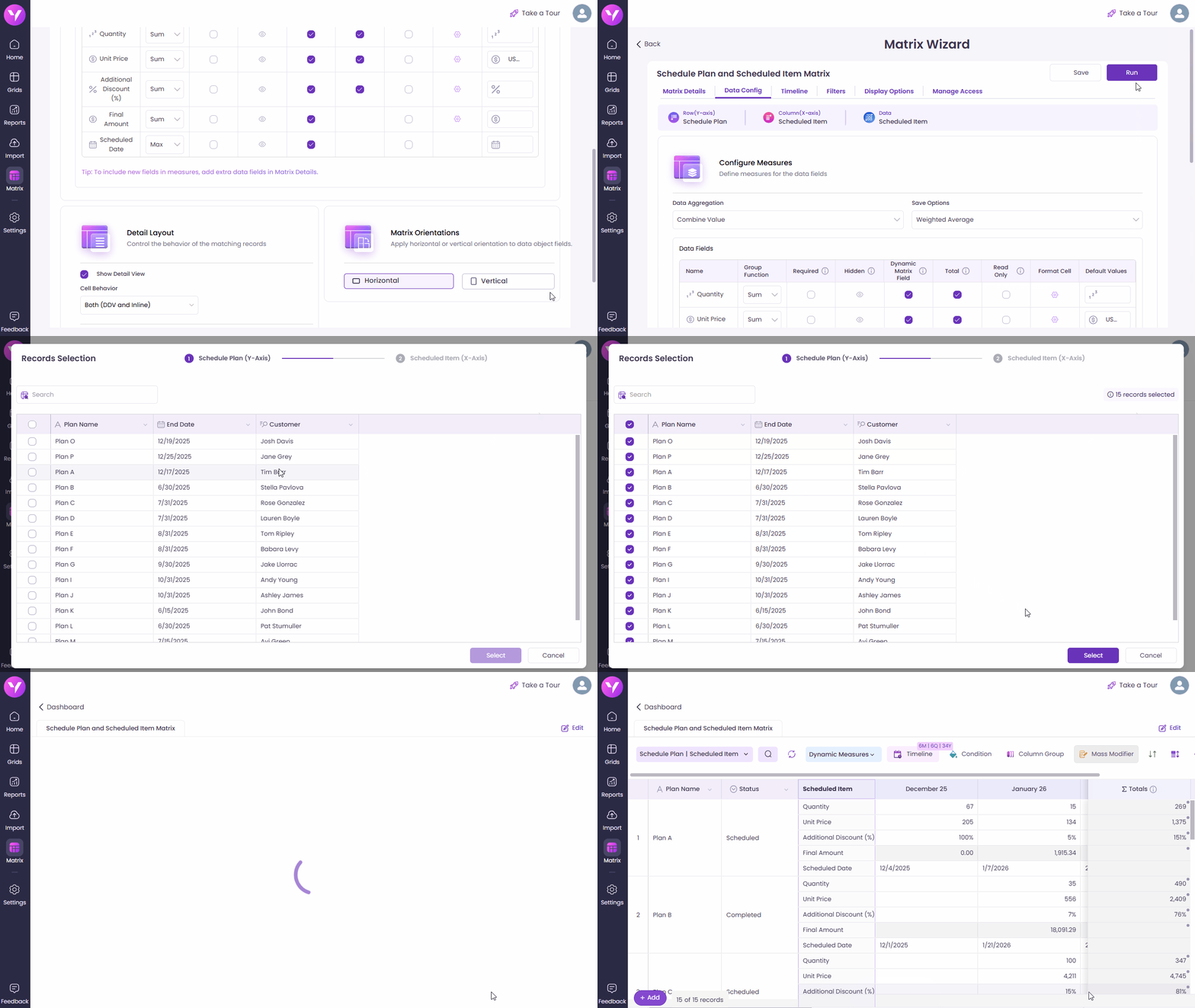
Matrix now supports **Vertical Orientation** for dynamic measures, giving you more flexibility to design layouts that match your forecasting and analysis needs.
You can choose between **Horizontal** (default) and **Vertical** orientations, allowing you to optimize readability, reduce column clutter, and work more comfortably on smaller screens. This is similar to the layout options available in Salesforce.
#### Key Highlights
* **Configurable Measure Orientation**\
Select **Horizontal** or **Vertical** directly in the Matrix Designer. The setting is saved and applied automatically at runtime.
* **Cleaner, More Readable Layouts**\
In Vertical orientation, each dynamic measure appears as its own row under the relevant record, and reducing wide tables.
* **Smart Measure Controls**\
Hiding or showing dynamic measures now hides or shows entire measure rows, keeping the matrix clean and focused.
* **Totals That Just Work**\
Each measure row displays its own totals, and hidden measures automatically hide their totals as well.
Vertical orientation gives you more control over how data is presented, making complex forecasts easier to read and compare. Whether you prefer fewer columns, more rows, or better usability on compact screens, this enhancement helps tailor the Matrix experience to how you work.
Vertical Measures in Matrix
## Extended Improvements from Wave Embedded v18 :tada:
In addition to the new enhancements introduced in **Wave Browser Extension v47**, several key enhancements from **Wave Embedded** **v18** has been extended to ensure a consistent and seamless experience across both platforms.
**Wave Embedded v18 Enhancements**
* [Grid Field Configuration](/valorx-wave/release-notes/wave-embedded/embedded-version-18.md#grid-field-configuration)
* [Configurable Record Pagination](/valorx-wave/release-notes/wave-embedded/embedded-version-18.md#configurable-record-pagination)
* [Matrix – Support Vertical Orientation](/valorx-wave/release-notes/wave-embedded/embedded-version-18.md#matrix-support-vertical-orientation)
* [Import Data Directly into the Grid](/valorx-wave/release-notes/wave-embedded/embedded-version-18.md#import-data-directly-into-the-grid)
* [Hide & Unhide Columns](/valorx-wave/release-notes/wave-embedded/embedded-version-18.md#hide-and-unhide-columns)
* [Cross Filter](/valorx-wave/release-notes/wave-embedded/embedded-version-18.md#cross-filter)
* [Support Filtering by User Queues](/valorx-wave/release-notes/wave-embedded/embedded-version-18.md#support-filtering-by-user-queues)
* [Lookup Picker Support for Polymorphic Fields](/valorx-wave/release-notes/wave-embedded/embedded-version-18.md#lookup-picker-support-for-polymorphic-fields)
* [Column Grouping](/valorx-wave/release-notes/wave-embedded/embedded-version-18.md#column-grouping)
* [New Actions in Grid More Options Button](/valorx-wave/release-notes/wave-embedded/embedded-version-18.md#new-actions-in-grid-more-options-button)
* [Defaulting Behavior for New Rules, Filters, and Column Groups](/valorx-wave/release-notes/wave-embedded/embedded-version-18.md#defaulting-behavior-for-new-rules-filters-and-column-groups)
* [Rules UI Enhancements](/valorx-wave/release-notes/wave-embedded/embedded-version-18.md#rules-ui-enhancements)
* [Permissions Tab](/valorx-wave/release-notes/wave-embedded/embedded-version-18.md#permissions-tab)
* [UI Consistency Improvements Across Toolbar Overlays & Menus](/valorx-wave/release-notes/wave-embedded/embedded-version-18.md#ui-consistency-improvements-across-toolbar-overlays-and-menus)
* [Grouping by Visible Records for Lookup Fields](/valorx-wave/release-notes/wave-embedded/embedded-version-18.md#grouping-by-visible-records-for-lookup-fields)
* [Automatic Refresh of Matrix After Save](/valorx-wave/release-notes/wave-embedded/embedded-version-18.md#automatic-refresh-of-matrix-after-save)
***
{% updates format="full" %}
{% update date="2026-02-06" %}
## Wave Extension v47.1 - Hotfix
This hotfix release focuses on improving reliability, data accuracy, and overall user experience
#### What’s Improved
* **Matrix Launch Stability**\
Matrices launched via the Salesforce Matrix Launcher now load correctly and open the Matrix Wizard without displaying a blank screen.
* **Smart Import Currency Accuracy**\
In multi-currency orgs, Smart Import now preserves the correct Opportunity currency and amount after import, preventing unintended currency changes.
* **Profile Card Org Visibility**\
The profile card now consistently displays both Production and Sandbox orgs when users are logged into both environments.
Thank you for your continued feedback. This hotfix ensures a smoother and more reliable experience with Wave Extension.
{% endupdate %}
{% endupdates %}
***
Wave Browser Extension v47 delivers a cleaner settings experience and aligns key capabilities with Wave Embedded, helping users move seamlessly between products without relearning workflows. As always, we value your feedback. Please use the new in-app rating options to let us know how we’re doing. More enhancements are coming soon.