> For the complete documentation index, see [llms.txt](https://docs.valorx.com/llms.txt). Markdown versions of documentation pages are available by appending `.md` to page URLs; this page is available as [Markdown](https://docs.valorx.com/valorx-wave/release-notes/wave-browser-extension/wave-version-49.md).
# April 26 Release (v49)
We're excited to bring Wave Browser Extension v49, one of our biggest updates yet! This release brings a powerful set of enhancements designed to make your grid experience faster, smarter, and more personalized than ever before.
Whether you're a standard user looking for more control over how you view and update your data, or a Designer and Admin looking for more flexibility in how you configure and manage grids, v49 has something meaningful for everyone.
Read on to explore everything that's new. 🎉
*Version 49 also includes updates from v49.1., v49.2 and v49.3.*
***
## Release Highlights :tada:
This update introduces the most impactful improvements in this release, designed to enhance how you work and get more value from the product.
### Filter Collections - Save & Manage Your Filters
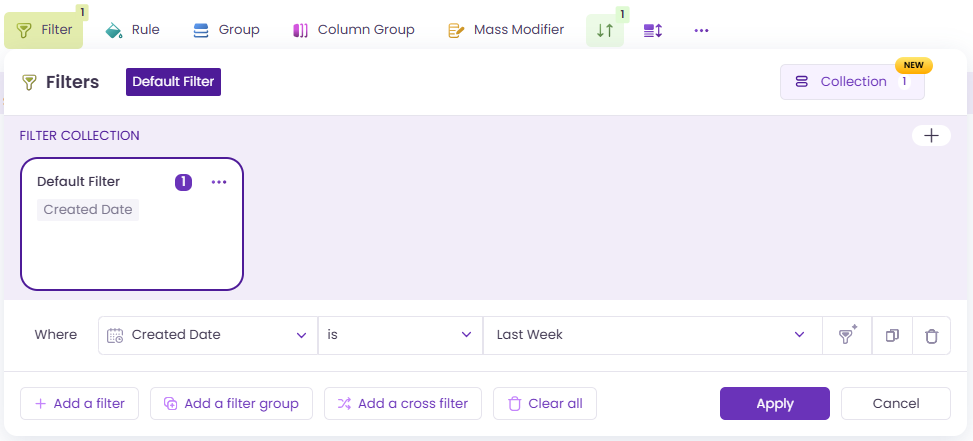
Managing multiple filter configurations is now easier with [Filter Collections](/valorx-wave/wave-data-management/managing-grid-data/filter.md#filter-collection). Filter Collections let you save, rename, duplicate and switch between different filter configurations right within the grid. Create up to unlimited collections per grid, duplicate them, rename them, and switch between them in seconds.
Filter Collections
Autosave keeps everything up to date in the background. And for grids with existing filters, they'll carry forward automatically as the "Default" collection.
Default Filter
*This feature was first introduced in Wave Embedded v21. For full documentation, see* [*Filter Collections →*](https://docs.valorx.com/valorx-wave/wave-data-management/managing-grid-data/filter#filter-collection)
### Custom Grid Creation
Designers can now empower standard users to manage and share personalized grid views directly from a Global Grid (Main copy) without requiring designer intervention.
Standard users can create their own working copy from the globally shared grid, allowing them to tailor the grid to their needs while preserving the original configuration. These personal copies are saved in the user’s Grid Selection Dropdown and can be customized independently.
**What's available in Wave Extension:**
* Each user can create up to 10 [Custom Grids](/valorx-wave/wave-experience/type-of-grid-in-wave.md#custom-grid-my-grids) per [Global Grid](/valorx-wave/wave-experience/type-of-grid-in-wave.md#global-grid)
* Custom Grids are displayed under their parent Global Grid in the Grid Picker with quick actions for Share, Rename, Duplicate, and Delete
* Users with sharing permission can share Custom Grids with other users directly
In Wave Extension, Custom Grid is configured at the global level and accessed under Manage Access.
Custom Grid
*This feature was first introduced in Wave Embedded v20. For full details including sharing rules and cascade deletion, see* [*Custom Grid →*](/valorx-wave/wave-admin-and-control/enterprise-control.md)
### Color Palette for Greater Visual Control
The color palette has been expanded to a full spectrum across Wave Extension, giving users far more freedom to visually organize and highlight their data.
The expanded palette is now available across [Column Group](https://docs.valorx.com/valorx-wave/wave-data-management/managing-grid-data/column-group), [Rules](https://docs.valorx.com/valorx-wave/wave-data-management/managing-grid-data/rule), and [Color Bar](https://docs.valorx.com/valorx-wave/wave-data-management/managing-grid-data/condition#color-bar).
Color Palette - Color Bar
*This feature was first introduced in Wave Embedded v21. For full information, see* [*Color Palette →*](/valorx-wave/release-notes/wave-embedded/embedded-version-21.md#color-palette-for-greater-visual-control)
### Grid Controls — Import, Export & Toolbar Visibility
You can now control whether users can import or export data directly from [Grid Controls](/valorx-wave/wave-admin-and-control/enterprise-control.md). Both are enabled by default, but unchecking them removes the buttons from the grid entirely, keeping the interface clean and focused.
Import and Export records
Two new checkboxes also let you hide the Filters and Rules buttons from the runtime toolbar, ideal for grids where everything is pre-configured and you want users focused on the data rather than the settings.
Toolbar when “Hide filters in toolbar” is enabled.
Toolbar when “Hide rules in toolbar” is enabled.
This feature was first introduced in Wave Embedded v20. For full documentation, see [Grid Controls →](/valorx-wave/wave-admin-and-control/enterprise-control.md)
### Row-Level Selection for Mass Modifier
Users can now select one or more rows directly using the row number to apply [Mass Modifier](https://docs.valorx.com/valorx-wave/wave-data-management/managing-grid-data/mass-modifier) updates across all applicable editable fields in a single action — no need to manually select individual columns or adjust the grid layout.
*This feature was first introduced in Wave Embedded. For more info, see* [*Mass Modifier →*](https://docs.valorx.com/valorx-wave/wave-data-management/managing-grid-data/mass-modifier)
### Flexible Footer Totals Configuration
A new [Aggregation Footer](https://docs.valorx.com/valorx-wave/wave-data-management/data-insights-and-summary#footer-row) checkbox in [Field Configuration](https://docs.valorx.com/valorx-wave/wave-experience/create-a-new-grid/grid-wizard-in-salesforce#field-configuration) lets Admins and Designers control, column by column, whether a numeric field displays its aggregated value in the grid footer. In Wave Extension, this is configured exclusively through Field Configuration.
*This feature was first introduced in Wave Embedded v21. For more info, see* [*Aggregation Footer →*](https://docs.valorx.com/valorx-wave/wave-data-management/data-insights-and-summary#footer-row)
***
## Extended Improvements from Wave Embedded v20 and v21 :tada:
In addition to the new enhancements introduced in **Wave Browser Extension v49**, several key enhancements from **Wave Embedded** **v20 and v21** has been extended to ensure a consistent and seamless experience across both platforms.
**Wave Embedded v21 Enhancements**
* [Enhanced Filter Collection & Limit](https://docs.valorx.com/valorx-wave/release-notes/wave-embedded/embedded-version-21#enhanced-filter-collection-and-limit)
* [Color Palette for Greater Visual Control](https://docs.valorx.com/valorx-wave/release-notes/wave-embedded/embedded-version-21#color-palette-for-greater-visual-control)
* [Smarter, More Powerful Lookup Experience](https://docs.valorx.com/valorx-wave/release-notes/wave-embedded/embedded-version-21#smarter-more-powerful-lookup-experience)
* [Row-Level Selection for Mass Modifier](https://docs.valorx.com/valorx-wave/release-notes/wave-embedded/embedded-version-21#row-level-selection-for-mass-modifier)
* [Flexible Footer Totals Configuration](https://docs.valorx.com/valorx-wave/release-notes/wave-embedded/embedded-version-21#flexible-footer-totals-configuration)
* [Streamlined Grid & Matrix Publishing Experience](https://docs.valorx.com/valorx-wave/release-notes/wave-embedded/embedded-version-21#streamlined-grid-and-matrix-publishing-experience)
* [Picklist Selection with Built-in Search](https://docs.valorx.com/valorx-wave/release-notes/wave-embedded/embedded-version-21#picklist-selection-with-built-in-search)
**Wave Embedded v20 Enhancements**
* [Filter Collections - Save & Manage Your Filters](https://docs.valorx.com/valorx-wave/release-notes/wave-embedded/embedded-version-20#filter-collections-save-and-manage-your-filters)
* [Grid Controls — Import, Export & Toolbar Visibility](https://docs.valorx.com/valorx-wave/release-notes/wave-embedded/embedded-version-20#grid-controls-import-export-and-toolbar-visibility)
* [Date Filters Made Simpler and Smarter](https://docs.valorx.com/valorx-wave/release-notes/wave-embedded/embedded-version-20#date-filters-made-simpler-and-smarter)
* [Display Formatting for Matrix X-Axis](https://docs.valorx.com/valorx-wave/release-notes/wave-embedded/embedded-version-20#display-formatting-for-matrix-x-axis)
Wave Browser Extension v49 is a big step forward in bringing the full power of Wave to your browser. Every enhancement in this release was built with your workflows in mind, whether you're managing data daily or configuring grids for your team.
As always, we'd love to hear your feedback. If you have questions or run into anything, don't hesitate to reach out to our support team. Thank you for being part of the Wave journey, here's to building smarter grids together! 🚀
***
{% updates format="full" %}
{% update date="2026-06-25" %}
## Wave Browser Extension v49.3 - Update
Wave Browser Extension v49.3 includes an update to the authentication flow that improves how IP restriction errors are surfaced to users.
#### What's New
**Authentication & Session Handling**\
Users with Salesforce Profile-level IP range restrictions will now see a clear message on the login screen when access is restricted. If you see this message, please reach out to Valorx Support for assistance.
*Note: This applies to Salesforce orgs with Login IP Range restrictions configured at the Profile level.*
If you encounter any login issues, our support team is ready to help. Contact us at
{% endupdate %}
{% update date="2026-06-11" %}
## Wave Browser Extension v49.2 - Security Release
This release updates the authentication architecture to align with Salesforce's latest security policies for Connected Apps.
#### What's Improved
**Authentication Flow via Valorx API** \
In response to recent Salesforce security policy changes for Connected Apps, the authentication flow has been updated to remain fully compliant and ensure a secure login experience for all users.
Thank you for your continued feedback. This hotfix ensures a more secure and reliable authentication experience with Wave Extension.
{% endupdate %}
{% update date="2026-05-15" %}
## Wave Browser Extension v49.1 - Hotfix
This hotfix release focuses on authentication security improvements after Salesforce Summer'26 release and matrix configuration reliability.
#### What's Improved
**PKCE Authentication Flow** \
Replaced the Web Server Flow with the PKCE ("Pixy") flow for login, access token, and refresh token handling. Client Secret dependency has been fully removed, resulting in a more secure and streamlined authentication experience.
**Matrix Wizard Save for Telescope Timeline Configurations** \
Fixed an issue where saving changes in the Matrix wizard did not work for older matrices configured with a Telescope Timeline. Admin users can now successfully save updates to telescope timeline configurations without errors.
Thank you for your continued feedback. This hotfix delivers a more secure authentication flow and improved matrix configuration reliability in Wave Extension.
{% endupdate %}
{% endupdates %}







.png?alt=media&token=759e254b-be1f-484c-a6f3-cfc2a3a51536)