> For the complete documentation index, see [llms.txt](https://docs.valorx.com/llms.txt). Markdown versions of documentation pages are available by appending `.md` to page URLs; this page is available as [Markdown](https://docs.valorx.com/valorx-wave/release-notes/wave-browser-extension/wave-version-51.md).

# August 26 Release (v51)

Wave Extension v51 is here with exciting improvements across Grids and Matrices! Enjoy smarter configuration, clearer progress tracking, enhanced export options, and a more intuitive experience throughout Wave.

<h2 align="center"><mark style="color:purple;">Release Highlights 🎉</mark></h2>

### Matrix Import and Export to Excel or CSV

Export your Matrix data to Excel or CSV in just a few clicks. For date-based exports, choose a custom date range or include historical data for a more complete view. Wave also alerts you in advance if your Matrix layout requires adjustments to ensure a clean export.

For more information, see the [Matrix Import and Export documentation](/valorx-wave/matrix/matrix-import-and-export.md).

<figure><img src="https://2237973035-files.gitbook.io/~/files/v0/b/gitbook-x-prod.appspot.com/o/spaces%2F65f4C4H8V5e0YV342mwp%2Fuploads%2F7lHUEwmYDkxasLrmlauC%2FImport%20Matrix%20Extension.gif?alt=media&amp;token=dac4664c-e98a-4dd6-9415-f89868a1663c" alt=""><figcaption><p>Import Matrix</p></figcaption></figure>

<figure><img src="https://2237973035-files.gitbook.io/~/files/v0/b/gitbook-x-prod.appspot.com/o/spaces%2F65f4C4H8V5e0YV342mwp%2Fuploads%2FtdUvgvV16jN7iePHMFFI%2FMatrix%20Export%20v2.gif?alt=media&amp;token=413bacbc-f041-4960-ab3a-07fd74999231" alt=""><figcaption><p>Export Matrix</p></figcaption></figure>

### A Simpler, More Powerful 360 Snap Experience

#### Automatic 360 Snap Creation

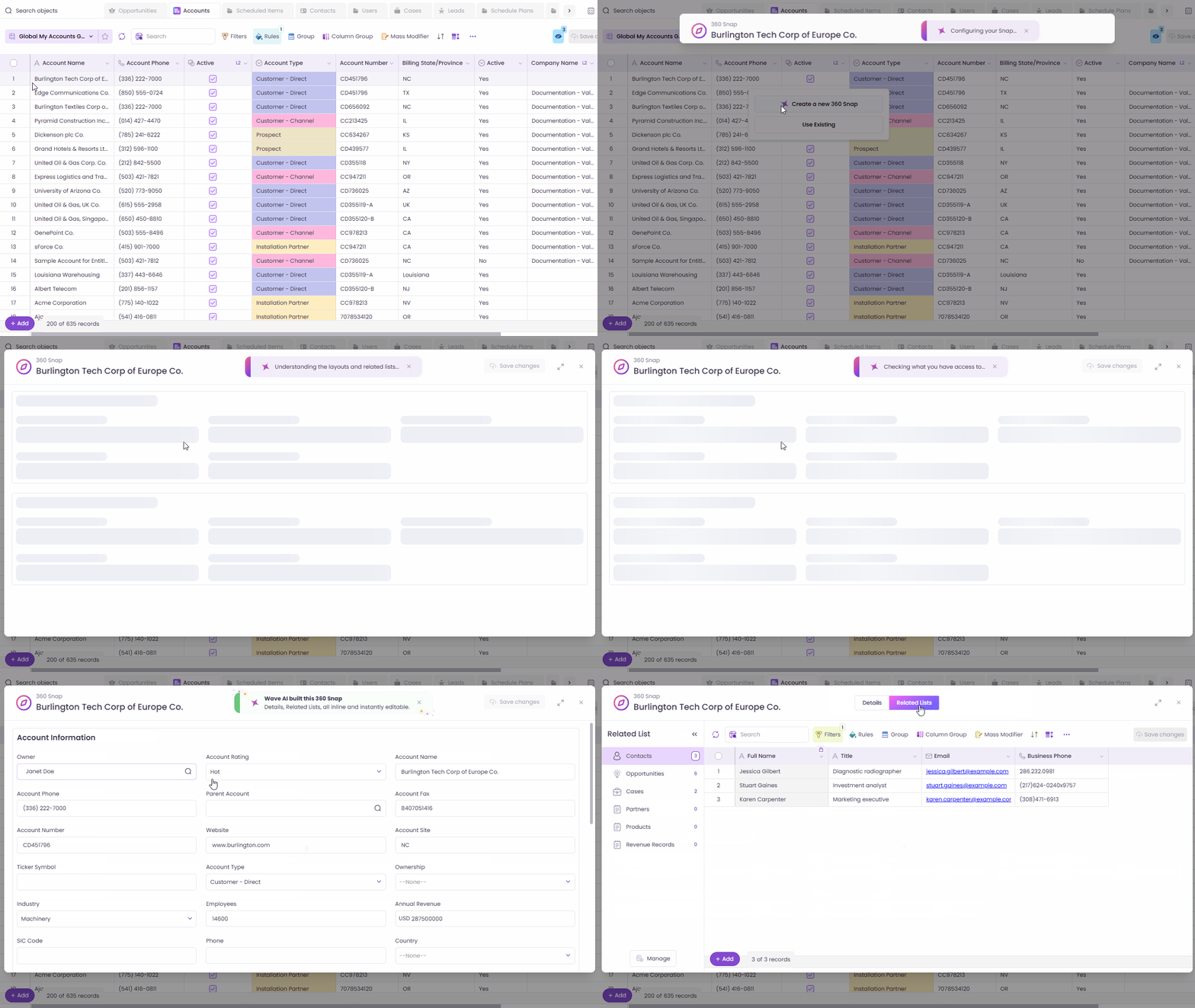
Setting up a [360 Snap](/valorx-wave/wave-admin-and-control/360-snap.md) is now faster and easier. When a lookup field doesn’t have a 360 Snap yet, Designers can create one directly from the lookup field without any manual configuration.

Wave automatically builds the 360 Snap using the object’s existing page layout, including the Details view and related lists.

If the object has one record type, Wave uses its page layout automatically. If there are multiple record types, you can choose the page layout you want from the record type picker.

This feature is available to **Designers** only.

<figure><img src="https://2237973035-files.gitbook.io/~/files/v0/b/gitbook-x-prod.appspot.com/o/spaces%2F65f4C4H8V5e0YV342mwp%2Fuploads%2FiUbE4zDaIyCMToHmCNpj%2FAutomatic%20360%20Snap%20Creation%20.gif?alt=media&amp;token=2e484733-dd43-4928-ba99-7ab680cabd9e" alt=""><figcaption></figcaption></figure>

#### 360 Snap Viewer: Enhanced Design and Usability

The [360 Snap Viewer](/valorx-wave/wave-admin-and-control/360-snap.md#what-is-360-viewer) now provides a cleaner and more intuitive experience. The record name is displayed prominently at the top, while related lists are easier to manage with a simplified interface. You can also close the viewer with a single click.

<figure><img src="https://2237973035-files.gitbook.io/~/files/v0/b/gitbook-x-prod.appspot.com/o/spaces%2F65f4C4H8V5e0YV342mwp%2Fuploads%2FIhfWR6SUMWLobp23lKQv%2F360%20Snap%20Viewer%20Enhanced%20Design%20and%20Usability%20v2.gif?alt=media&amp;token=ef494f94-98ab-49cb-a6c9-be6075df6653" alt=""><figcaption><p>360 Snap</p></figcaption></figure>

#### Open 360 Snap from List Views

You can now open a **360 Snap** directly from a standard Salesforce list view without leaving the page. The Snap icon is available for each record and remains accessible while scrolling, sorting, filtering, or moving between pages.

<figure><img src="https://2237973035-files.gitbook.io/~/files/v0/b/gitbook-x-prod.appspot.com/o/spaces%2F65f4C4H8V5e0YV342mwp%2Fuploads%2FsWBO2sop910hsqZ0dbcu%2F360%20Snap%20Directly%20from%20List%20Views.gif?alt=media&amp;token=fcb44b55-e24f-4cbe-9a71-1b901d0c8d62" alt=""><figcaption><p>Open 360 Snap from List Views</p></figcaption></figure>

### Filter Collection Improvements

Managing [Filter Collections](/valorx-wave/wave-data-management/managing-grid-data/filter.md#filter-collection) is now simpler and more intuitive. You can set a default filter to control which collection loads with your Grid, rename collections with a single click, and enjoy a cleaner, less cluttered card view.

Wave also provides confirmation toasts when you duplicate or delete a collection, so you can immediately see when the action is completed.

You can now create a Filter Collection without any filter conditions. This allows you to save an empty collection as a starting point for future filtering. Only one empty Filter Collection can exist at a time.

<figure><img src="https://2237973035-files.gitbook.io/~/files/v0/b/gitbook-x-prod.appspot.com/o/spaces%2F65f4C4H8V5e0YV342mwp%2Fuploads%2FjwOAZDnzeKUQVBDWeSDZ%2FFilter%20Collection.gif?alt=media&amp;token=9df7a71a-1a3d-4eec-850e-8b77fa7b4c5a" alt=""><figcaption><p>Filter Collection</p></figcaption></figure>

You can now customize how currency and date values are displayed in your Grid. For currency fields, choose whether to display the currency prefix. For date fields, select from standard, easy-to-read, or custom date formats.

***

<h2 align="center"><mark style="color:purple;">Minor Enhancements 🌟</mark></h2>

### A Better Connections Experience

Switching between connected orgs is now simpler. The connections list is easier to browse, with clearer labeling and a smoother experience when logging out or switching orgs.

<figure><img src="https://2237973035-files.gitbook.io/~/files/v0/b/gitbook-x-prod.appspot.com/o/spaces%2F65f4C4H8V5e0YV342mwp%2Fuploads%2FzLzd1XcU9uEfJ2WA0b6e%2FProfile%20Card%20Popup%20Enhancement.gif?alt=media&amp;token=99b2f5ab-5d72-43d4-bad5-329538265233" alt=""><figcaption><p>A Better Connections Experience</p></figcaption></figure>

### Improved Multi-Select Picklist Experience

Multi-Select Picklist values are now easier to view and manage in filters and grid cells. Grid cells display as many values as possible, with the remaining values shown as a simple count, such as +&#x35;**.** Hover over the cell to see all selected values at a glance.

When editing a cell, a clean dropdown makes it easy to search for and add values.

<figure><img src="https://2237973035-files.gitbook.io/~/files/v0/b/gitbook-x-prod.appspot.com/o/spaces%2F65f4C4H8V5e0YV342mwp%2Fuploads%2FY5pEPrrKyBOByJBc9zTW%2FMulti-Select%20Picklist%20Chips%20Enhancement.gif?alt=media&amp;token=990d31fa-1557-49c7-a060-5c1f0dd5a40e" alt=""><figcaption><p>Improved Multi-Select Picklist Experience</p></figcaption></figure>

### Day Names in Timeline Custom Date Format

Add the day of the week to your Timeline headers using the DDD or DDDD tokens, for short (Wed) or full (Wednesday) day names.

<figure><img src="https://2237973035-files.gitbook.io/~/files/v0/b/gitbook-x-prod.appspot.com/o/spaces%2F65f4C4H8V5e0YV342mwp%2Fuploads%2FcjukObOJaYi0uQicfmQP%2FDay%20Names%20in%20Timelines.gif?alt=media&amp;token=127e50fd-6be2-40fa-8fab-c2db36e30a8a" alt=""><figcaption><p>Day Names in Timeline Custom Date Format</p></figcaption></figure>

### Save Progress Indicator

Wave now provides real-time visibility into the save process for both Grid and Matrix. Track each stage as records are validated, saved to Salesforce, and updated in the Grid or Matrix. A live batch count also shows the progress as records are processed.

This makes it easier to monitor save operations and understand the status of large data updates.

<figure><img src="https://2237973035-files.gitbook.io/~/files/v0/b/gitbook-x-prod.appspot.com/o/spaces%2F65f4C4H8V5e0YV342mwp%2Fuploads%2F333OwYH3k33D2VPzMw7W%2FSave%20Progress.gif?alt=media&amp;token=116ebef0-eb31-4fe1-8d72-3626c0bf5b2b" alt=""><figcaption><p>Save Progress Indicator</p></figcaption></figure>

### Format Options for Currency and Date Fields

<figure><img src="https://2237973035-files.gitbook.io/~/files/v0/b/gitbook-x-prod.appspot.com/o/spaces%2F65f4C4H8V5e0YV342mwp%2Fuploads%2FmDqbyg86wbwbknNcZcYS%2FFormat%20Options%20for%20Currency%20and%20Date%20Fields.gif?alt=media&amp;token=0ed96390-c70d-404a-8a3d-b38e77a5d4cd" alt=""><figcaption><p>Format Options for Currency and Date Fields</p></figcaption></figure>

### Configurable Save Batch Size

Admins can now configure the number of records processed in each save batch. By breaking large save operations into smaller batches, you can help avoid payload limit errors and process large data updates more smoothly.

<figure><img src="https://2237973035-files.gitbook.io/~/files/v0/b/gitbook-x-prod.appspot.com/o/spaces%2F65f4C4H8V5e0YV342mwp%2Fuploads%2FlTPIEfjgSq2xcbkPooan%2FSave%20Batch.gif?alt=media&amp;token=ba5a1c98-b8b8-4ac6-952a-09b3a258fc5e" alt=""><figcaption><p>Configurable Save Batch Size</p></figcaption></figure>

***

## Extended Improvements from Wave Embedded v23 and v24:tada:

These minor enhancements from Wave Embedded v23 and v24 have also been extended to Wave Browser Extension v51.

**Wave Embedded v24 Enhancements**

* [360 Snap Default Tab Configuration](/valorx-wave/release-notes/wave-embedded/embedded-version-24.md#id-360-snap-default-tab-configuration)
* [Support for Most Recently Used Scope](/valorx-wave/release-notes/wave-embedded/embedded-version-24.md#support-for-most-recently-used-scope)
* [Row Grouping Enhancements](/valorx-wave/release-notes/wave-embedded/embedded-version-24.md#row-grouping-enhancements)
* [Smarter Header Dropdown Filtering](/valorx-wave/release-notes/wave-embedded/embedded-version-24.md#smarter-header-dropdown-filtering)

**Wave Embedded v23 Enhancements**

* [Smart Import: Clearer Guidance for Lookup Field Mapping](/valorx-wave/release-notes/wave-embedded/embedded-version-23.md#smart-import-clearer-guidance-for-lookup-field-mapping)
* [Cleaner Matrix Toolbar](/valorx-wave/release-notes/wave-embedded/embedded-version-23.md#cleaner-matrix-toolbar)
* [Enhanced Loading Animation](/valorx-wave/release-notes/wave-embedded/embedded-version-23.md#enhanced-loading-animation)
* [Smarter Object Picker Search](/valorx-wave/release-notes/wave-embedded/embedded-version-23.md#smarter-object-picker-search)
* [Control Grid and Matrix Personalization](/valorx-wave/release-notes/wave-embedded/embedded-version-23.md#control-grid-and-matrix-personalization)

We hope these enhancements help you get even more out of Wave. Thank you for your continued feedback and support!