> For the complete documentation index, see [llms.txt](https://docs.valorx.com/llms.txt). Markdown versions of documentation pages are available by appending `.md` to page URLs; this page is available as [Markdown](https://docs.valorx.com/valorx-wave/release-notes/wave-embedded/embedded-version-20.md).
# March 26 Release (v20)
Wave Embedded v20 is here. This release is all about giving you more control over your grids from what users can see, to how data is filtered, to how dates are displayed. Smarter permissions, cleaner toolbars, and more flexible filtering, all in one update.
***
## Release Highlights :tada:
This update introduces the most impactful improvements in this release, designed to enhance how you work and get more value from the product.
### Filter Collections - Save & Manage Your Filters
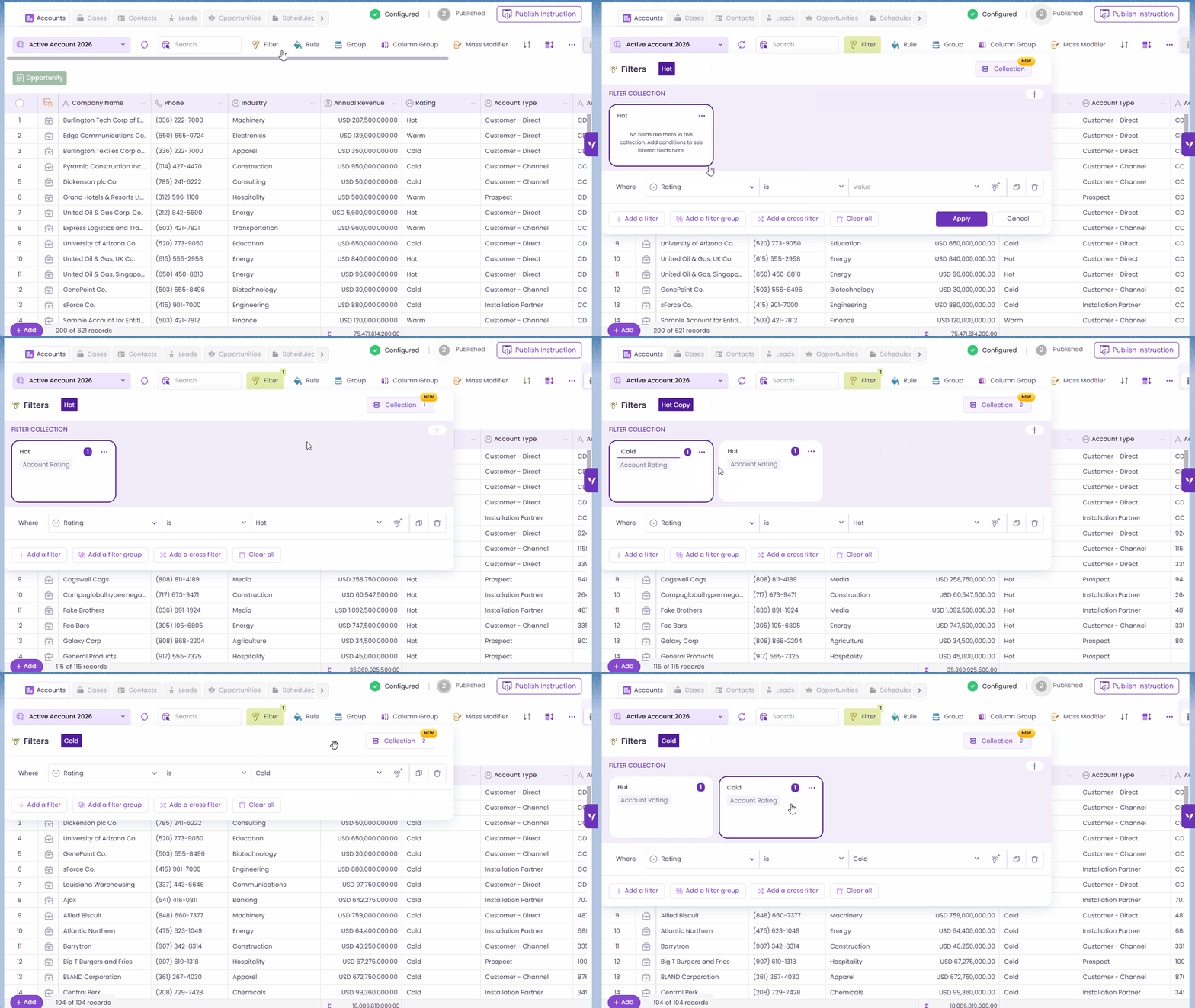
Managing multiple filter configurations is now easier with [Filter Collections](/valorx-wave/wave-data-management/managing-grid-data/filter.md#filter-collection). Filter Collections let you save, rename, duplicate and switch between different filter configurations right within the grid. Create up to unlimited collections per grid, duplicate them, rename them, and switch between them in seconds.
Filter Collections
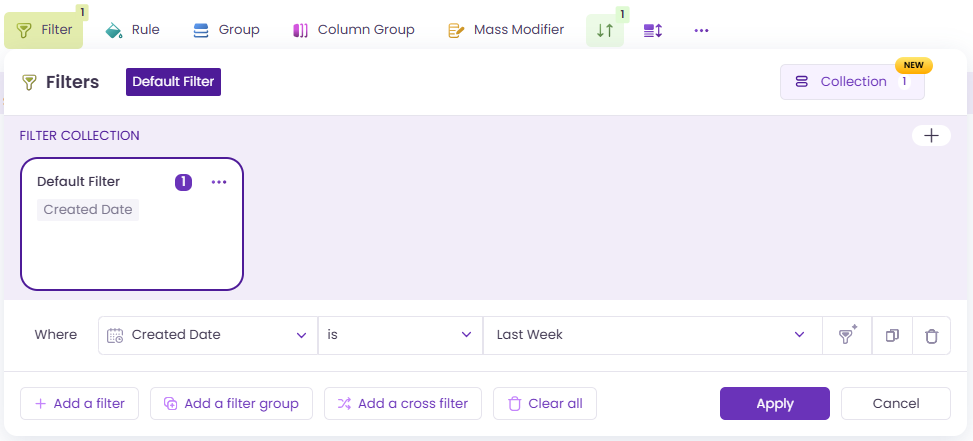
Autosave keeps everything up to date in the background. And for grids with existing filters, they'll carry forward automatically as the "Default" collection. Find out more about Filter Collections [here](/valorx-wave/wave-data-management/managing-grid-data/filter.md#filter-collection).
Default Filter
## New Enhancements ✨
New capabilities are introduced to give you greater flexibility and support evolving business needs.
### Grid Controls — Import, Export & Toolbar Visibility
You can now control whether users can import or export data directly from [Grid Controls](https://docs.valorx.com/valorx-wave/release-notes/wave-embedded/pages/UsFQihu4PZCQRPDYnrW2#id-2.-grid-controls-tab). Both are enabled by default, but unchecking them removes the buttons from the grid entirely; no confusion, no clutter.
Import and Export records
We've also introduced two new checkboxes to hide the [Filters](/valorx-wave/wave-data-management/managing-grid-data/filter.md) and [Rules ](/valorx-wave/wave-data-management/managing-grid-data/rule.md)buttons from the runtime toolbar. Perfect for when you've pre-configured everything and want users to stay focused on the data, not the settings.
Toolbar when “Hide filters in toolbar” is enabled.
Toolbar when “Hide rules in toolbar” is enabled.
As part of this update, access control options have been reorganized to the right panel for a cleaner admin experience. Find out more about the Grid Controls [here](https://docs.valorx.com/valorx-wave/release-notes/wave-embedded/pages/UsFQihu4PZCQRPDYnrW2#id-2.-grid-controls-tab).
### Date Filters Made Simpler and Smarter
The old **No Date / Calendar** switcher has been removed. Date literals are always visible and ready to use. Choose from options like **Yesterday, Today, Next Week**, or enter a specific number of days (up to **99,999**). Need a precise date? The calendar picker remains available.
This enhancement also applies to [**Rules**](/valorx-wave/wave-data-management/managing-grid-data/rule.md) and [**Filters**](/valorx-wave/wave-data-management/managing-grid-data/filter.md), ensuring a consistent experience across configurations. *Fiscal Year* is currently not supported for Rules and Header Filters, but all other date literal options are available.
Date Filters
### Display Formatting for Matrix X-Axis
We’ve enhanced the [Matrix timeline](https://docs.valorx.com/valorx-wave/release-notes/wave-embedded/pages/309VTXFMBeFBzBOF1W5o#id-3.-timeline-matrix-configuration-visible-only-for-date-fields) by introducing [**predefined Date Format options**](https://docs.valorx.com/valorx-wave/release-notes/wave-embedded/pages/309VTXFMBeFBzBOF1W5o#id-3.-timeline-matrix-configuration-visible-only-for-date-fields) for the X-axis. You can now control how dates are displayed using a simple dropdown without impacting the underlying data.
#### What’s New
* **Date Format Dropdown**\
Select your preferred date format from a list of predefined options in the Timeline settings.
* **Built-in Format Preview**\
Each option in the dropdown includes a sample display (e.g., `MM/DD/YYYY – 12/01/2025`) to help you choose the right format.
* **Apply on Save**\
The selected format is applied to the Matrix X-axis after saving your changes.
* **Locale-Aware Display**\
Date formats adapt based on user locale where applicable.
Find out more about the date formatting [here](https://docs.valorx.com/valorx-wave/release-notes/wave-embedded/pages/309VTXFMBeFBzBOF1W5o#id-3.-timeline-matrix-configuration-visible-only-for-date-fields).
Date Formatting
***
v20 is about reducing friction — for admins configuring grids and for users working in them every day. These updates are built to fit into your workflows without disruption. As always, the details are in the docs, and more is on the way.