> For the complete documentation index, see [llms.txt](https://docs.valorx.com/llms.txt). Markdown versions of documentation pages are available by appending `.md` to page URLs; this page is available as [Markdown](https://docs.valorx.com/valorx-wave/release-notes/wave-embedded/embedded-version-24.md).

# August 26 Release (v24)

We’re excited to share the latest updates to Wave! 🎉

This release makes it easier to work with 360 Snaps, filter and organize your grid data, and manage your grids and matrices. We’ve also added improvements to the Wave dashboard and filtering experience to help you find and work with your data more efficiently.

Here’s what’s new:

<h2 align="center"><mark style="color:purple;">New Features</mark></h2>

### Automatic 360 Snap Creation

Setting up [360 Snap](/valorx-wave/wave-admin-and-control/360-snap.md) just got a lot easier. If a lookup field doesn't have a 360 Snap configured yet, you can now create one on the spot, no manual setup required. Wave builds a fully working 360 Snap directly from the object's page layout, so you get a working Details view and related lists automatically.

If the object has only one record type, Wave automatically uses that record type's page layout. If the object has multiple record types, a **record type picker** appears so you can select the layout to use.

This option is available only to **Designers**.

<figure><img src="https://2237973035-files.gitbook.io/~/files/v0/b/gitbook-x-prod.appspot.com/o/spaces%2F65f4C4H8V5e0YV342mwp%2Fuploads%2FTFwv3BN7kthEIdg6owjA%2FAutomatic%20360%20Snap%20Creation.gif?alt=media&amp;token=db12f224-7fef-4db1-a84c-51366f5f4ebc" alt=""><figcaption><p>Automatic 360 Snap Creation</p></figcaption></figure>

### Salesforce Scope Filters in Wave Grids

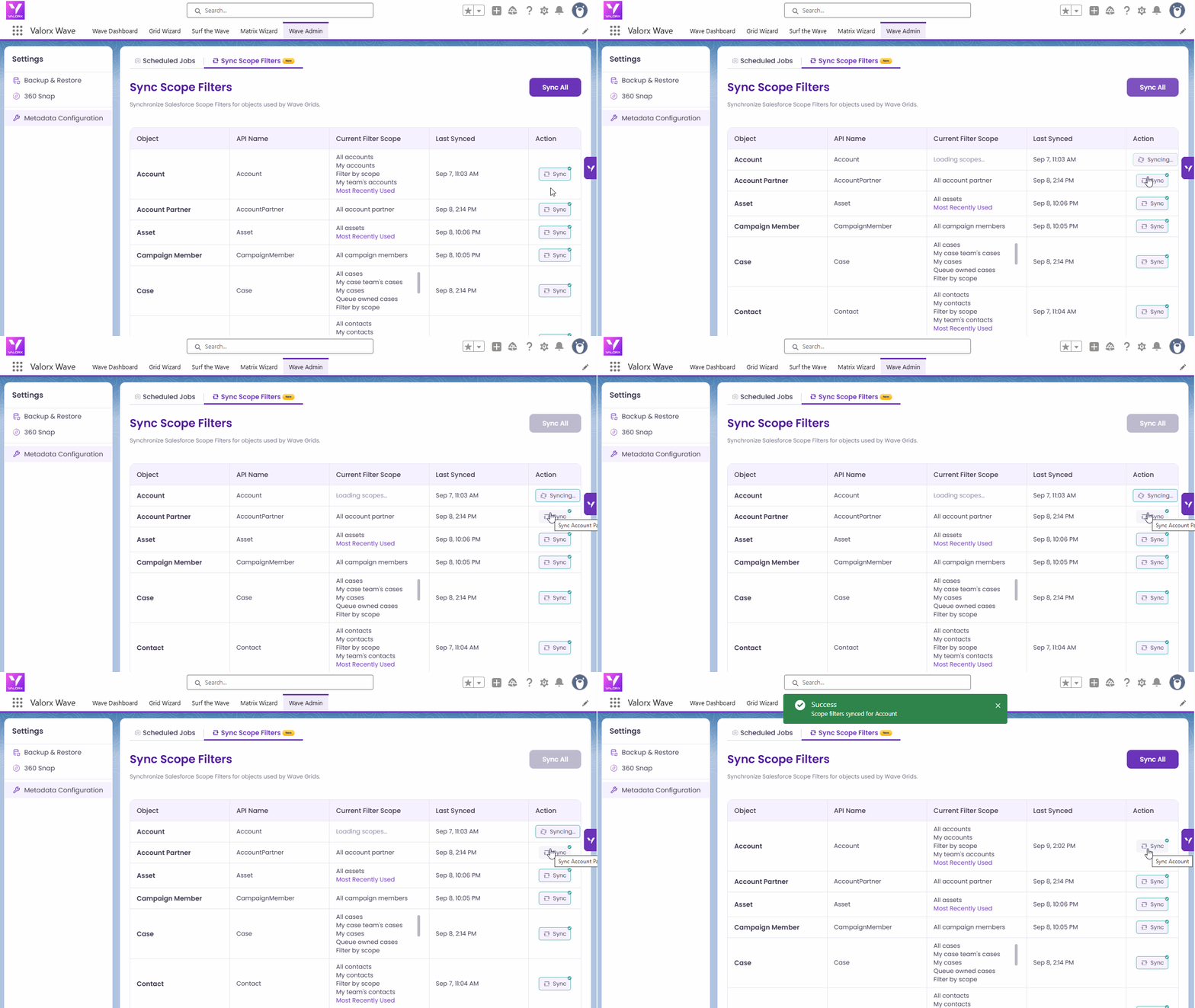
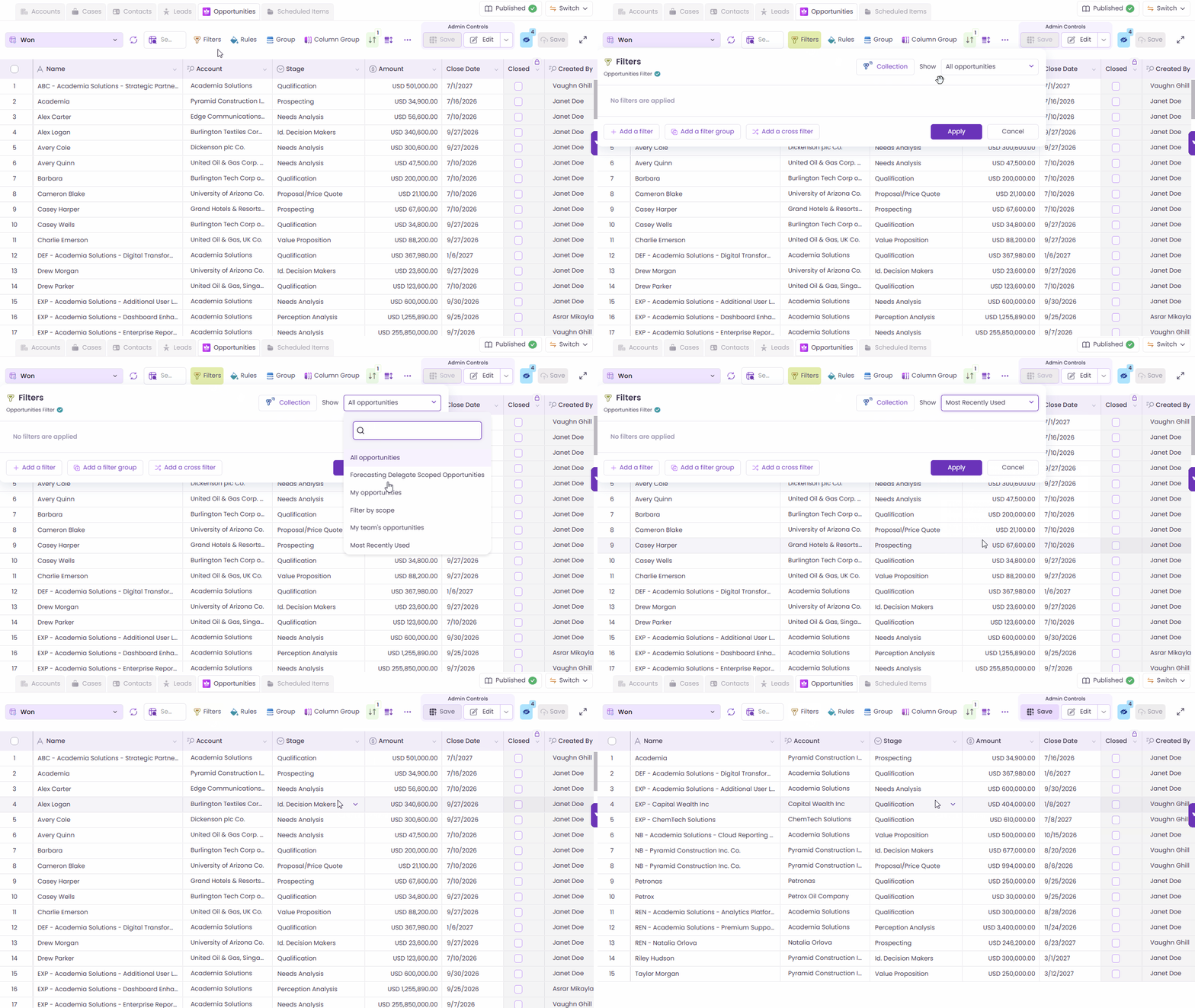
Filter your grids the same way you filter Salesforce list views. Wave grids now support native [Salesforce scope filters](/valorx-wave/wave-data-management/managing-grid-data/filter.md#show-scope-filters), like "My Opportunities," "My Team's Opportunities," or "My Territory's Opportunities," so you can narrow down records without building custom filter logic. Scope options are kept in sync automatically, and Admins can force a refresh anytime from Wave Admin.

<figure><img src="https://2237973035-files.gitbook.io/~/files/v0/b/gitbook-x-prod.appspot.com/o/spaces%2F65f4C4H8V5e0YV342mwp%2Fuploads%2FgCXKAcHleukprVIVoURl%2FFilter%20by%20Scope.gif?alt=media&amp;token=d49ce1f7-45ba-4d0e-9582-6caaa9011c37" alt=""><figcaption><p>Filter by Scope</p></figcaption></figure>

<figure><img src="https://2237973035-files.gitbook.io/~/files/v0/b/gitbook-x-prod.appspot.com/o/spaces%2F65f4C4H8V5e0YV342mwp%2Fuploads%2Fcwl9FMVtAXrJ4OABNnDr%2FSync%20Scope%20Filter.gif?alt=media&amp;token=cccb0c27-73ca-470c-a958-b27b30a62758" alt=""><figcaption><p>Sync Scope Filters in Wave Grids</p></figcaption></figure>

<h2 align="center"><mark style="color:purple;">New Enhancements</mark></h2>

### 360 Snap Default Tab Configuration

You can now choose which tab opens by default when users open a [360 Snap](/valorx-wave/wave-admin-and-control/360-snap.md).

Set any available tab, such as **Details** or a related list, as the default tab for each Snap configuration. This helps users get to the information they need faster.

<figure><img src="https://2237973035-files.gitbook.io/~/files/v0/b/gitbook-x-prod.appspot.com/o/spaces%2F65f4C4H8V5e0YV342mwp%2Fuploads%2FhVL9rSKYmY0feLnw9M9H%2F360%20Snap%20Default%20Tab%20Configuration.gif?alt=media&amp;token=9fba1037-1762-4efa-8a2f-3e573f09eec6" alt=""><figcaption><p>360 Snap Default Tab Configuration</p></figcaption></figure>

### Support for Most Recently Used Scope

Easily find records you recently used with the new **Most Recently Used** scope filter. When selected, the scope shows only recently used records for supported Salesforce objects.

<figure><img src="https://2237973035-files.gitbook.io/~/files/v0/b/gitbook-x-prod.appspot.com/o/spaces%2F65f4C4H8V5e0YV342mwp%2Fuploads%2FjEzSHDO3NpEIYbHdWfZY%2FSupport%20Most%20Recently%20Used.gif?alt=media&amp;token=ce12a5da-eace-4385-8b0d-4c3176ea7fc8" alt=""><figcaption></figcaption></figure>

### Wave Dashboard Card and List View Enhancements

We’ve improved Cards and List View in [Wave Dashboard](/valorx-wave/wave-workspace/wave-dashboard.md) to make grid and matrix information easier to understand.

* **Cards** now show who last modified the grid or matrix. Hover over the information to see the user and modification time.
* **List View** now shows last modified dates in a simpler **time ago** format.
* Descriptions are now visible in List View.
* Hover behavior is now consistent across Cards and List View.
* Wave now prevents duplicate grid or matrix names and asks you to choose a different name when a name is already in use.

<figure><img src="https://2237973035-files.gitbook.io/~/files/v0/b/gitbook-x-prod.appspot.com/o/spaces%2F65f4C4H8V5e0YV342mwp%2Fuploads%2FR3p3FuPabPsWhPinurF7%2FWave%20Dashboard%20Card%20and%20List%20View%20Enhancements.gif?alt=media&amp;token=c2ccd0f5-52a4-42f9-ab4b-7a40e061ba6d" alt=""><figcaption><p>Wave Dashboard Card and List View Enhancements</p></figcaption></figure>

### Row Grouping Enhancements

[Row grouping](/valorx-wave/wave-data-management/managing-grid-data/group.md) now supports more field types and works better with filtered data.

* You can now group rows by **Datetime** fields.
* **Lookup** grouping now supports more than 50 groups, removing the previous limit.
* Lookup grouping shows all lookup values available in the grid based on the filters you’ve applied.

<figure><img src="https://2237973035-files.gitbook.io/~/files/v0/b/gitbook-x-prod.appspot.com/o/spaces%2F65f4C4H8V5e0YV342mwp%2Fuploads%2FrDfIj7ZthbgQfkVScE0d%2FRow%20Grouping%20Enhancements.gif?alt=media&amp;token=0149c637-7661-46c5-9a85-b751593fdacd" alt=""><figcaption><p>Row Grouping Enhancements</p></figcaption></figure>

### Smarter Header Dropdown Filtering

[Header filters](/valorx-wave/wave-data-management/data-control-and-customization.md#filter-features) now make it easier to find the values you need.

The footer shows how many records are currently loaded and how many records exist in Salesforce. If the value you need is not currently loaded, you can search Salesforce directly and load the matching records.

* **Search:** Search the next 200 records. The number of records searched depends on the configured Default Page Size.
* **Load All:** Load all available records.

**Note:** This feature is currently available only for **Wave Grid** and supports **Picklist**, **Multipicklist**, **Lookup**, **String**, **Number**, **Date**, **DateTime**, **Boolean** fields.

<figure><img src="https://2237973035-files.gitbook.io/~/files/v0/b/gitbook-x-prod.appspot.com/o/spaces%2F65f4C4H8V5e0YV342mwp%2Fuploads%2FR4BMIdQ902c914i2u4At%2FSmarter%20Header%20Dropdown%20Filtering.gif?alt=media&amp;token=770b893e-ffd9-4cd2-b1f2-7fedd0ec1fb7" alt=""><figcaption><p>Smarter Header Dropdown Filtering</p></figcaption></figure>

***

## Bug Fixes 🐛

We've resolved multiple issues to improve stability, permissions handling, and overall grid and matrix performance.

* **Cross-Filter Does Not Display All Available Relationships**\
  Fixed an issue where Cross-Filter did not display all valid relationships available for the selected object, even though they were available in the Related List configuration. Cross-Filter now displays all supported relationships consistently.
* **Aura Component Does Not Enforce Valorx Wave Use Access**\
  Fixed an issue where the Aura component could load a Grid or Matrix even when the user did not have **Valorx Wave Use Access**. Aura and LWC components now enforce the same permission and display an appropriate access error when the permission is missing.
* **Unable to Schedule Wave Apex Class Manually**\
  Fixed an issue where the Apex Class provided by Wave Embedded could not be scheduled through Salesforce's **Schedule Apex** UI due to a missing parameterless constructor. The class can now be scheduled successfully.
* **Freeze and Unfreeze Column State**\
  Fixed an issue where column **Freeze/Unfreeze** changes in a runtime Matrix were not saved. Column freeze states are now remembered and persist after refreshing or reloading the Matrix.

***

### Known Issue

**Continuous Loader Appears Before Matrix Record Selection Modal**

When opening an existing Matrix or creating a new Matrix, the application may intermittently display a continuous loader before the **Matrix Record Selection** modal appears. This may prevent users from proceeding with Matrix configuration or runtime flows.

**Workaround:** Reload the entire page to load the Matrix again.

***

{% updates format="full" %}
{% update date="2026-09-14" %}

## Wave Embedded v24.1

Wave Embedded v24.1 improves consistency and reliability in the Matrix feature, with an enhancement to keep matching records in sync and a fix for a misleading record count in Mass Modifier.

#### Update All Matching Records When an Anchor Field Changes in a Matrix

In a Single-Object Matrix, updating an **anchor field** now updates the value across **all matching records** for the row, instead of only the first matching record.

This keeps the anchor field value consistent across all related Matrix records and eliminates the need to update each matching record individually.

<figure><img src="https://2237973035-files.gitbook.io/~/files/v0/b/gitbook-x-prod.appspot.com/o/spaces%2F65f4C4H8V5e0YV342mwp%2Fuploads%2Fihbc3evxPLtjsrGlmBaV%2FUpdate%20All%20Matching%20Records%20When%20an%20Anchor%20Field%20Changes%20in%20a%20Matrix.gif?alt=media&amp;token=633f8cc8-6b55-4129-ac6b-46a6d126bfd0" alt=""><figcaption><p>Update All Matching Records</p></figcaption></figure>

#### Bug Fixes

* **Mass Modifier "All Records" Count**\
  The **All Records** count in Mass Modifier has been corrected to accurately reflect the records affected by the operation.
  {% endupdate %}
  {% endupdates %}

***

We hope these updates make it easier to create, filter, organize, and work with your data in Wave.