# Limitation

## Known Limitation

### Attachment Field Type

<table><thead><tr><th width="134" valign="top">Product</th><th valign="top">Wave Embedded</th></tr></thead><tbody><tr><td valign="top">Description</td><td valign="top">Users cannot upload attachments larger than 4 MB. Additionally, when a cross filter is applied, attachments fail to load entirely.</td></tr><tr><td valign="top">Reason</td><td valign="top">A recent Salesforce update caused these attachment features to stop working as expected.</td></tr><tr><td valign="top">Workaround</td><td valign="top">For the upload limit: compress or split files to keep them under 4 MB. For the cross-filter issue: remove any active cross filters before opening or uploading attachments, then reapply the filter afterwards.</td></tr></tbody></table>

### Lookup Filter

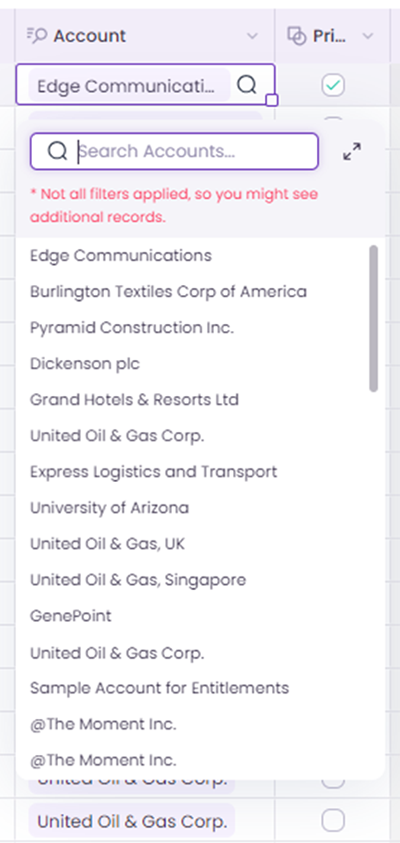
The **Lookup Filter**  functionality is designed to help users narrow down the records displayed in lookup cells within the grid. However, there are a few scenarios where the Lookup Filter does not apply. Please take note of the following unsupported scenarios:

1. **Field-to-Field Filtering**:
   * We do not support field-to-field filters on the Lookup Object. The Lookup Filter must be based on a value and not a comparison between two fields.
2. **Copy-Paste Functionality**:
   * Lookup filters are not applied when users paste data directly into the grid.&#x20;
3. **Mass Modifier**&#x20;
   * Lookup filters are not applicable in the Mass Modifier. As a result, users might see all possible lookup records instead of only those filtered by the criteria.
4. **Lookup Picker**:
   * Lookup filters are not supported in the Lookup Picker, leading to the display of all records instead of filtered results.
5. **Picklist Field Behavior**:
   * For Picklist fields, if the `startsWith` operator is used, the Lookup Filter will not distinguish between uppercase and lowercase letters. The filter will be case insensitive.
6. **Unrecognized Filters**:
   * If a filter cannot be parsed or applied, the system will display an error message and ignore that specific filter. In such cases, additional records outside of the filter criteria might be displayed.<br>

     <div align="left"><figure><img src="/files/LxuOSAvPWFQ9maqUI5Oz" alt="" width="200"><figcaption><p><br></p></figcaption></figure></div>

***Note**: These limitations help users understand when the Lookup Filter may not behave as expected. It's essential to consider these scenarios to ensure a consistent experience while working with lookup fields in the grid.*

### Row Action

**Row Actions** allow users to execute tasks directly from rows in the Wave Spreadsheet, enhancing efficiency. This section covers required permissions, component configurations, and usage limits to ensure proper setup and functionality.

**Permissions Required for Setup:**

1. **Designer (Admin):**
   * The Designer user must have **Grid Setup and Configuration** permissions to add Row Actions.
     * **How to Verify**:
       * Go to **Setup**, search for **Profile**, select the appropriate profile, and confirm that **Grid Setup and Configuration** is enabled.
2. **Standard User:**
   * The Standard user must have **Run Flow** permissions to execute Row Actions.
     * **How to Verify**:
       * Go to **Setup**, search for **Profile**, select the appropriate profile, and ensure that **Run Flow** is enabled.

**Component-Specific Limitations:**

1. **Aura Component:**
   * To pass data, the **Aura attribute** must have `access="global"` defined.
   * Additionally, the Aura component itself must also include `access="global"`.

```
<aura:component access="global">
    <aura:atribute name="recordId" type="Id" access="global"/>
```

1. **Lightning Web Component (LWC):**
   * The property `isExposed=true` must be set for the component to work with Row Actions.

```
<LightningComponentBundle xmlns="http://soap.sforce.com/2006/04/metadata">
    <apiVersion>62.0</apiVersion>
    <isExposed>true</isExposed>
</LightningComponentBundle>
```

**General Limitations:**

1. A maximum of **four Row Action buttons** can include both icons and text.
2. Up to **11 icon-only Row Action buttons** can be added in the row action configuration.

***Note:** By understanding these limitations, you can ensure proper setup and functionality for Row Actions in your application.*


---

# Agent Instructions: Querying This Documentation

If you need additional information that is not directly available in this page, you can query the documentation dynamically by asking a question.

Perform an HTTP GET request on the current page URL with the `ask` query parameter:

```
GET https://docs.valorx.com/valorx-wave/surf-the-wave/limitation.md?ask=<question>
```

The question should be specific, self-contained, and written in natural language.
The response will contain a direct answer to the question and relevant excerpts and sources from the documentation.

Use this mechanism when the answer is not explicitly present in the current page, you need clarification or additional context, or you want to retrieve related documentation sections.