> For the complete documentation index, see [llms.txt](https://docs.valorx.com/llms.txt). Markdown versions of documentation pages are available by appending `.md` to page URLs; this page is available as [Markdown](https://docs.valorx.com/valorx-wave/wave-data-management/managing-grid-data/dynamic-filter.md).
# Dynamic Filter
Apply Dynamic Filter for Wave Embedded
Dynamic Filters allow you to filter grid data **at runtime** using values passed from the surrounding context such as a Flow, component, or configuration instead of fixed (static) filter values.
They are especially useful when the filter value needs to change based on:
* The current record
* User input
* Flow variables or component parameters
> **Availability**\
> Dynamic Filters are supported **only in Wave Embedded**.
***
## How Dynamic Filter Work
Unlike standard filters where you manually enter values, Dynamic Filters:
* Receive values dynamically at runtime
* Apply those values directly to the Salesforce query
* Do not behave like standard Salesforce UI filters
Because of this, some UI behaviors differ from regular filters.
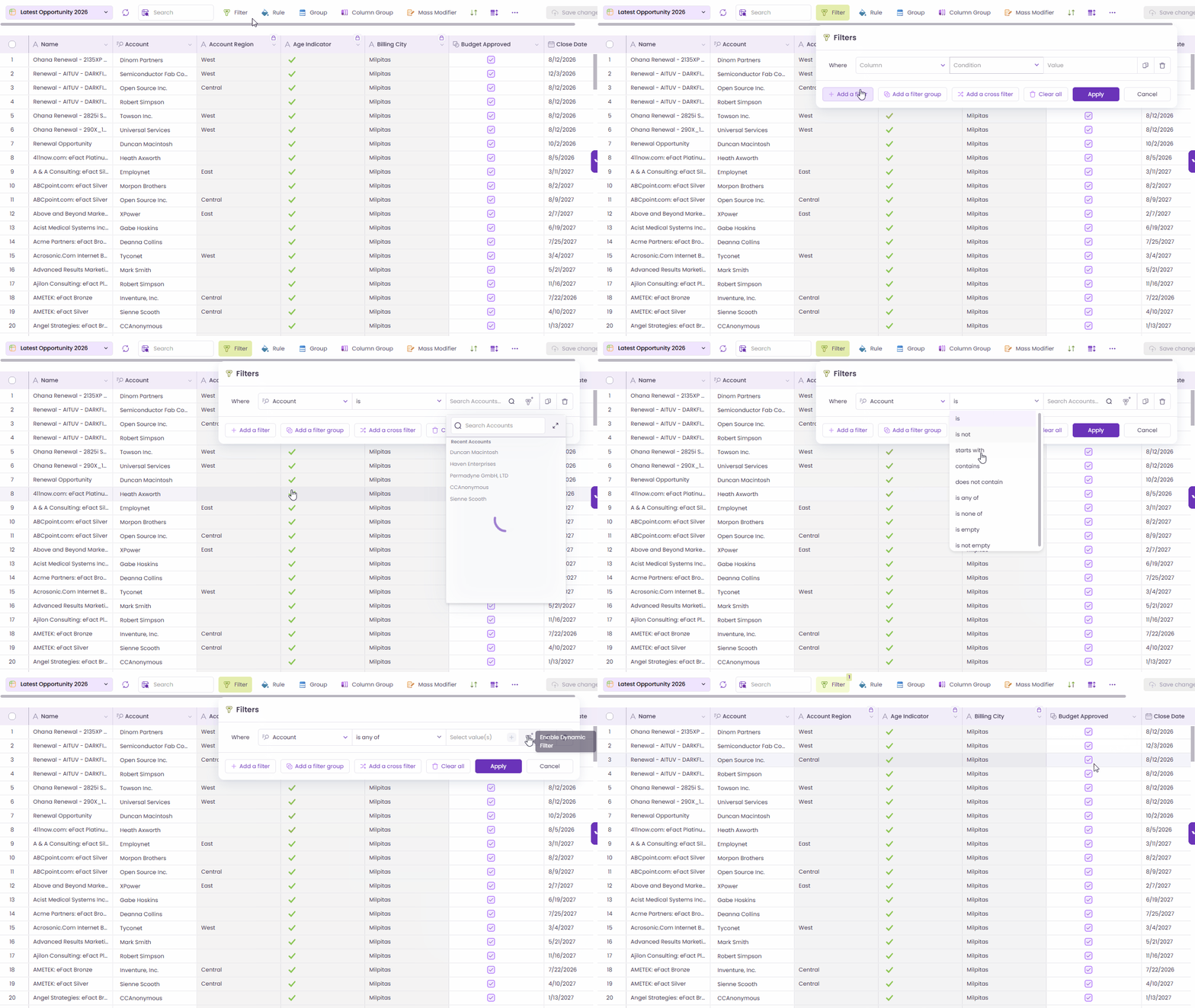
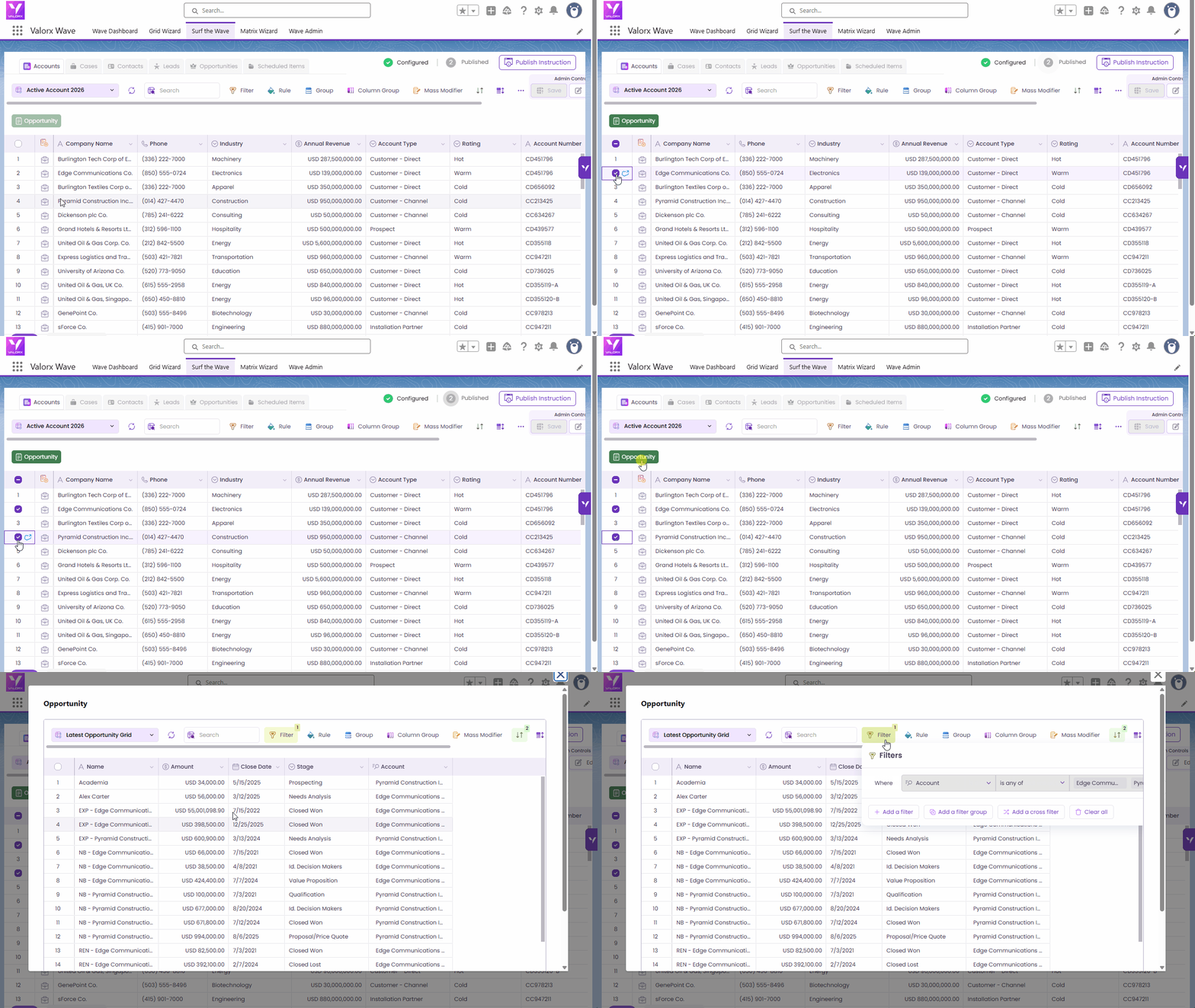
**Example:** Filter the Opportunity grid by Account using the AccountId lookup field, passing selected Account record IDs through the Dynamic Filter.
Dynamic Filter in Grid
Dynamic Filter in Matrix
**Note:**\
The example shown (such as **`Account.Name`**) demonstrates the format used for **Dynamic Filters**. This format can also be copied and used when configuring **input variables for the Valorx Grid in Flow**.
When a Flow passes a value to the grid input variable, the value is applied to the dynamic filter at runtime. This allows the grid to automatically filter records based on the value received from the Flow.
Refer to this section whenever a document mentions **using a Dynamic Filter**, as the same filter format can be reused for passing values dynamically.
***
### Filter Syntax Rules
Every Dynamic Filter string must follow a strict syntax. Incorrect formatting may cause filters to fail silently or return no results.
#### Basic Format
Each filter condition uses this structure:
```
FieldAPIName=Value1,Value2
```
#### Multiple Conditions
Chain multiple conditions in a single filter string:
• Use a **semicolon ( ; )** to separate filter conditions
• Use a **comma ( , )** to separate multiple values within one condition
#### Spacing Rules
{% hint style="warning" %}
**Important**
Spaces are not supported anywhere in the filter string. Avoid leading or trailing spaces in values or separators.
{% endhint %}
#### Example
```
Name=Maria,Bella,Andy;Stage=ClosedWon,ClosedLost;
```
What this does:
• Name filter — matches records where Name is Maria, Bella, or Andy
• Stage filter — matches records where Stage is ClosedWon or ClosedLost
• The semicolon (;) separates each filter condition
### Configuration Examples
#### Dynamic Value Assignment (from current record)
Use $record.FieldAPIName to pull values from the current record context:
```
FieldAPIName=$record.API_Name__c;
StageName=$record.StageName;
Name=$record.Name;
```
{% hint style="warning" %}
**Limitation**
The $record. syntax is not supported on App Pages. It works only in supported Wave Embedded contexts (such as record pages and embedded scenarios).
{% endhint %}
#### Static Value Assignment
Use fixed, hardcoded values:
```
FieldAPIName=StaticValue;
StageName=Needs;
Name=Maria;
```
***
## Configuring Dynamic Filters in a Salesforce Flow
When passing Dynamic Filter values from a Flow, you need to convert a collection variable into a properly formatted string before assigning it to the grid. The steps below walk you through the complete setup, from creating variables to activating the Flow.
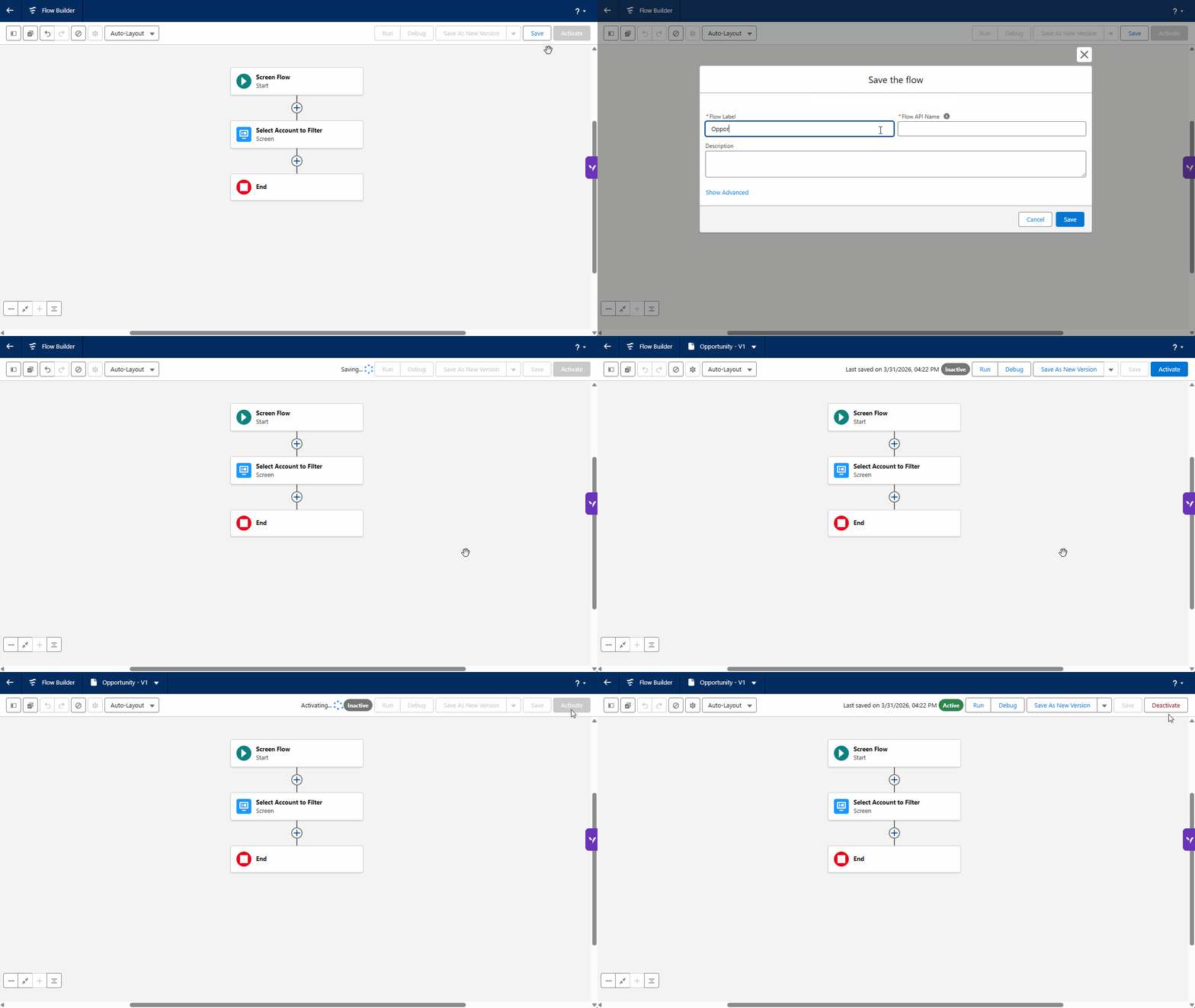
The goal: a user opens the Flow, picks one or more **Accounts** from a lookup screen, and the Valorx Grid shows only **Opportunities** belonging to those accounts using the `AccountId` lookup field.
Follow these steps end-to-end:
{% stepper %}
{% step %}
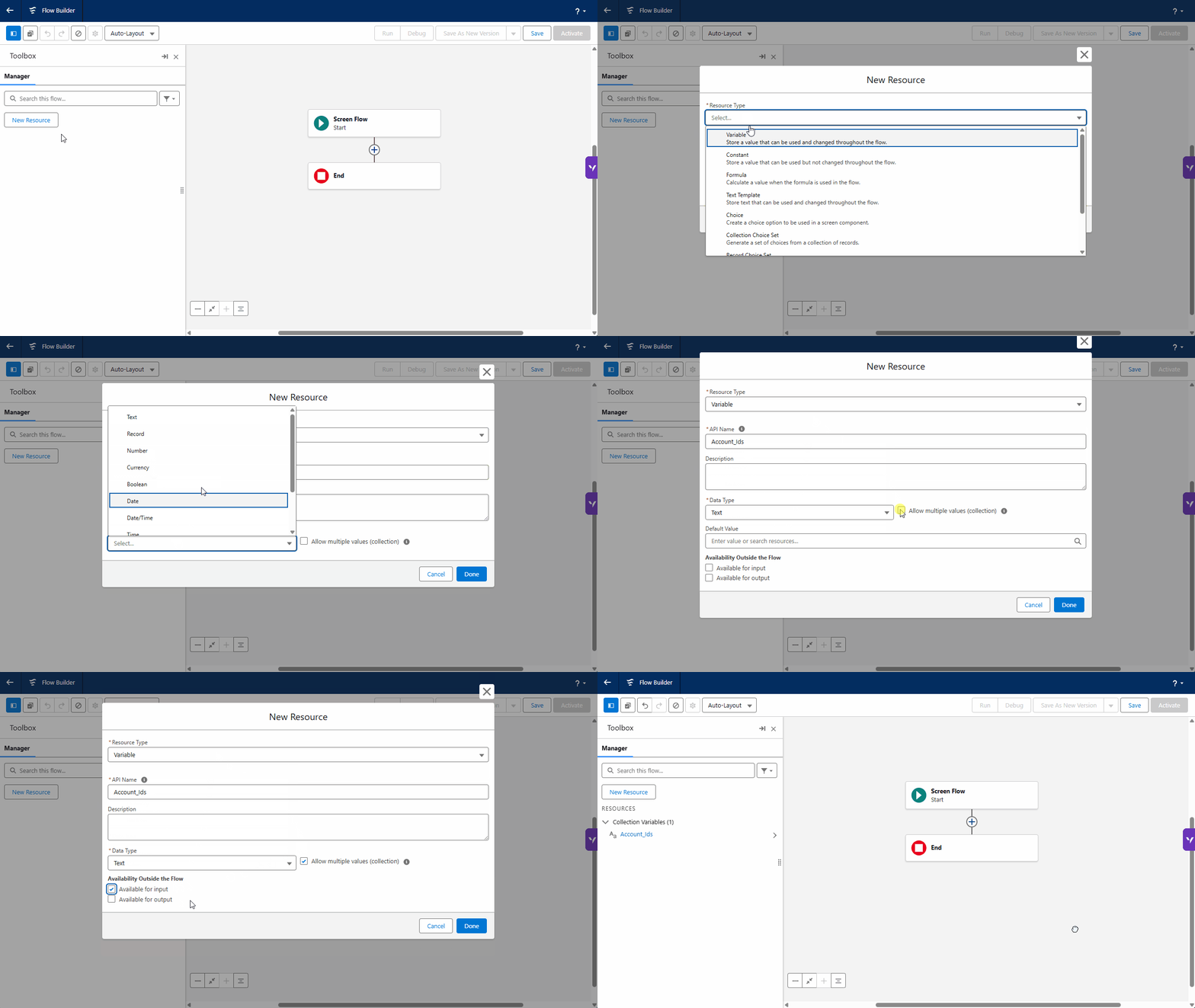
#### Create a Collection Variable for Account IDs
In your Flow, create a new variable to hold the Account Record IDs selected by the user. Use the **Text** data type. This is necessary because we need to extract and pass the raw ID string into the formula in the next step.
| Resources Type | Variable |
| ---------------------------------- | ------------ |
| Data Type | Text |
| API name | Account\_Ids |
| Allow multiple values (collection) | True |
| Available for input | True |
{% endstep %}
{% step %}
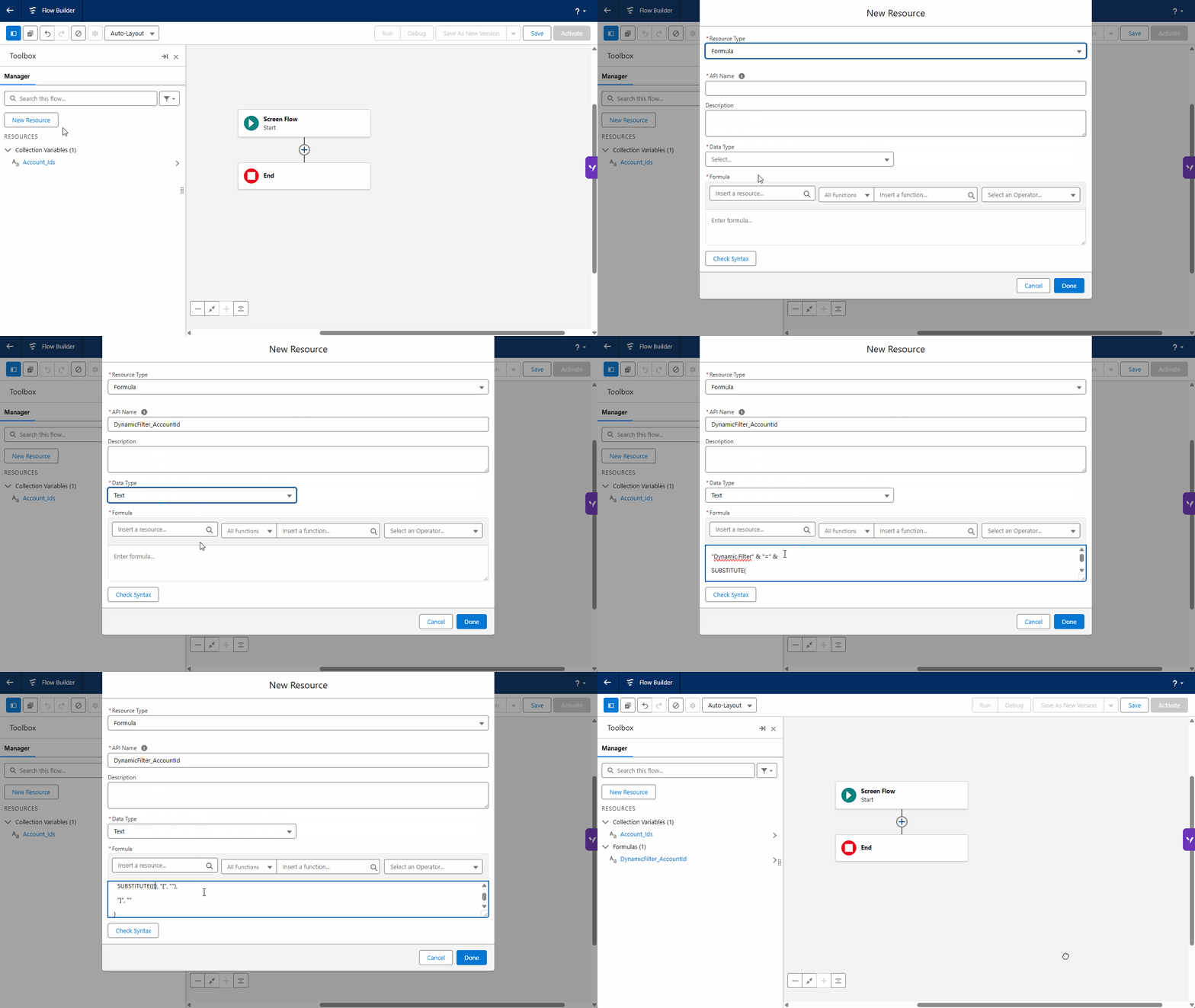
#### Convert the Collection to a String Using a Formula
Dynamic Filters only accept String values. Since your collection variable is a list, you must convert it using a Formula Variable. The formula uses SUBSTITUTE to strip the square brackets that Salesforce automatically adds to collections.
| Resources Type | Formula |
| -------------- | ------------------------ |
| API name | DynamicFilter\_AccountId |
| Data Type | Text |
```
"Dynamic.Filter" & "=" &
SUBSTITUTE(
SUBSTITUTE({!variable}, "[", ""),
"]", ""
)
```
Here, **Account.Name** is the Dynamic Filter configured in the Grid. The formula converts the collection into a properly formatted filter string.
{% hint style="info" %}
**Why this is needed:** When a user selects accounts, Salesforce stores IDs in the collection with square brackets — for example \[001xx000003DGbYAAW, 001xx000003DGbZAAW]. The brackets and spaces cannot be passed directly to the Dynamic Filter and must be removed first.
{% endhint %}
{% endstep %}
{% step %}
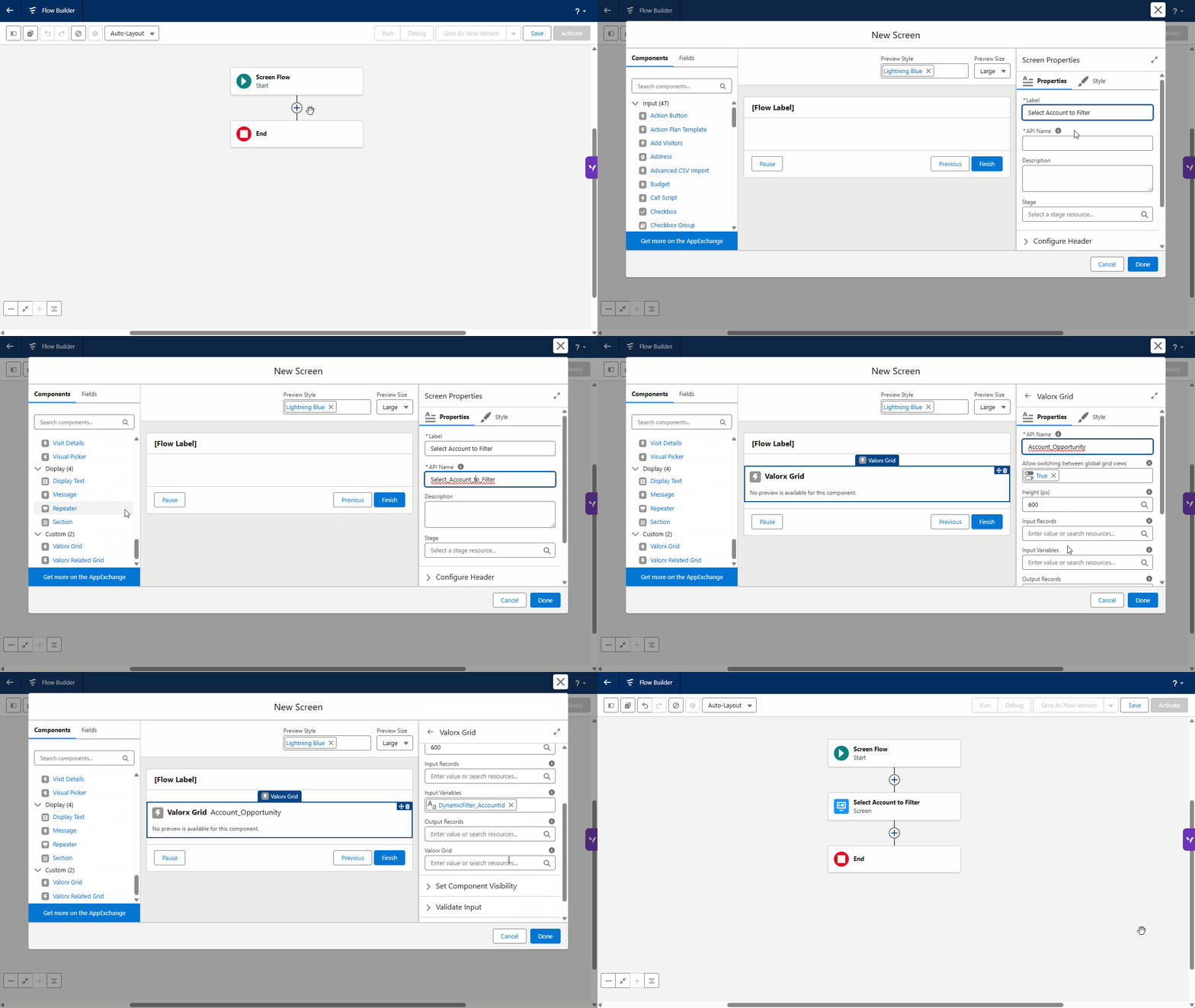
#### Add a screen with an Account lookup component
Add a Screen element to your Flow and place a Lookup component inside it, configured for the Account object. The lookup stores only the Id field into Account\_Ids. Users see Account names while searching, but what gets stored is the raw record ID, which is exactly what the Dynamic Filter expects.
| Component | Valor |
| ------------------------- | ------------------------------------------------------------------------------- |
| API Name | Account\_Opportunity |
| Allow multiple selections | True |
| Input Variables | DynamicFilter\_AccountId |
| Valorx Grid | [The Grid ID](/valorx-wave/wave-workspace/wave-dashboard.md#how-to-get-grid-id) |
{% hint style="info" %}
Make sure "Allow multiple selections" is enabled so the user can pick more than one account at a time.
{% endhint %}
{% endstep %}
{% step %}
#### Save and Activate the Flow
Once your configuration is complete, click **Save**, then click **Activate** to make the Flow available. After activation, you can configure it in the Grid Actions.
{% endstep %}
{% step %}
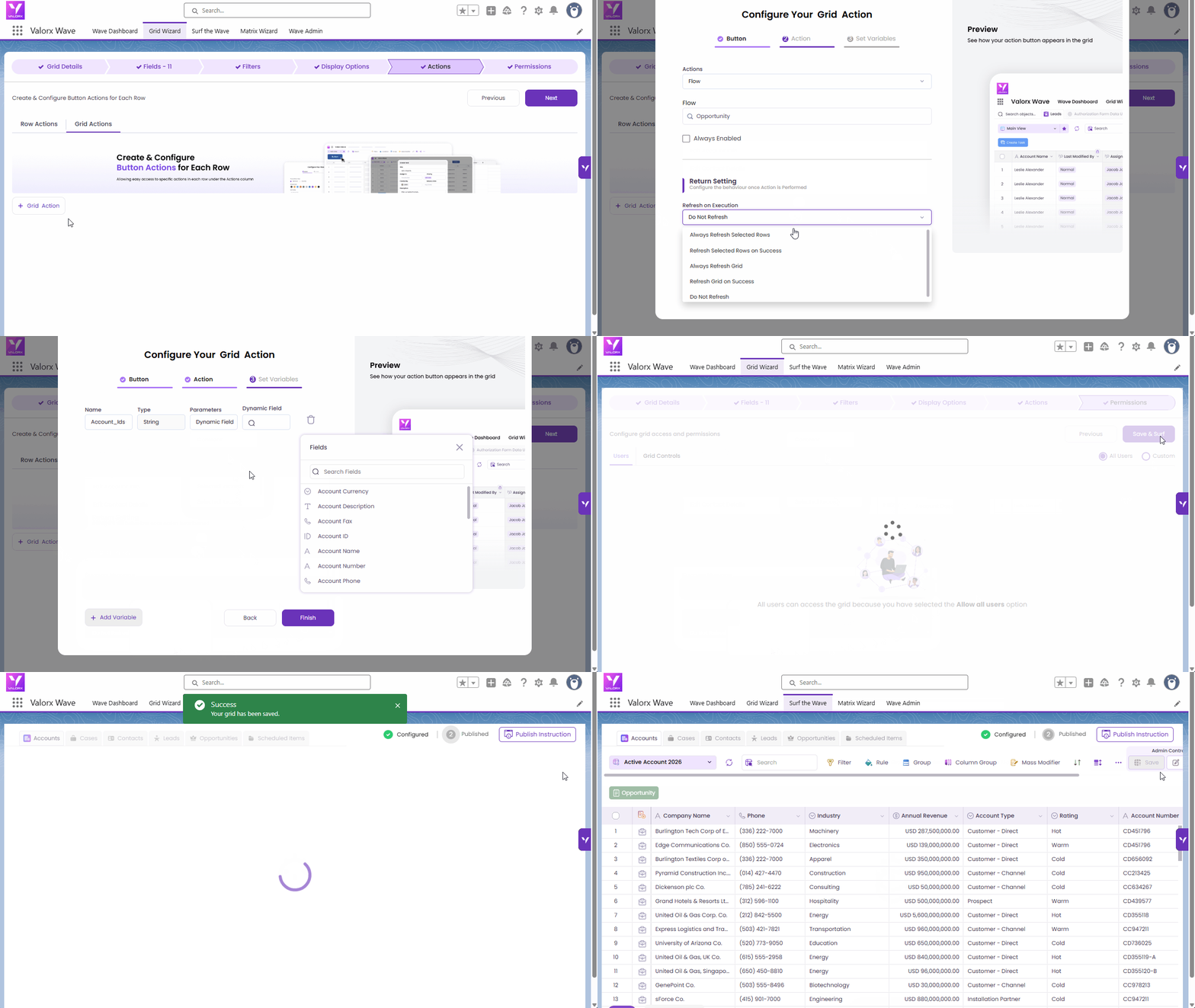
#### Configure the Grid Action Button.
In the Grid Actions settings, configure the button to connect your Flow to the grid.
Valorx Grid
Actions
Actions
Flow
Flow
Opportunity (the Flow created in steps 1–3)
Name
Account_Ids
Type
String
Parameters
Dynamic Field
Dynamic Field
Account ID
{% endstep %}
{% step %}
#### Try it yourself
Select one or more accounts below to see how the filter string is built and how the Opportunities grid responds in real time.
{% endstep %}
{% endstepper %}
***
## Supported Format and Limitation
Dynamic Filters work only with **supported formats and syntax**. Using unsupported formats may cause the filter to fail or behave unexpectedly.
### Date Fields
* Date values must be provided in **UTC format**
* Supported format: **YYYY-MM-DD**
❌ Other date formats are not supported.
### DateTime Fields
* Users can provide DateTime values in their **local timezone**
* At runtime:
* The value is converted and stored in **UTC**
* The displayed value also appears in **UTC DateTime format**
### Case Sensitivity
{% hint style="warning" %}
Dynamic Filter variable names are **case-sensitive**. The variable name must match exactly including uppercase and lowercase letters. Any mismatch will cause the filter to fail.
{% endhint %}
When passing values from:
* Flows
* Components
* Configurations
### Reference and Lookup Field Behavior
#### Filters on Reference Lookup Fields
* Only **record IDs** are supported as input values
#### Filters on Lookup Name Fields
* You can provide all record IDs, OR all lookup names
* You cannot mix record IDs and lookup names in the same filter condition
### IN Operator & UI Behavior
Dynamic Filters do not render like standard Salesforce filters.
#### UI Differences to Note
* The IN operator does not display value chips in the UI (values are still applied)
* Date fields do not show a date picker
* The grid displays the actual values used in the Salesforce query, not a user-friendly representation
*This is expected behavior and does not affect results.*
### App Page Limitations
{% hint style="danger" %}
**Limitation**
Dynamic Filters on App Pages do not support the $record. syntax. Record-specific values cannot be resolved dynamically on App Pages. Use Wave Embedded (record pages) instead.
{% endhint %}